How to Activate Your UAN 2026

Reviewed on 2026-09-01 by Dr. Shrawan Kumar Pathak.
Quick Reply: Since 1 August 2025, you activate your UAN through the UMANG app using Aadhaar based face authentication, not a branch visit. Install UMANG and the Aadhaar FaceRD app, enter your Aadhaar and linked mobile number, scan your face, and get your UAN and a temporary password by SMS.
Your Universal Account Number, the UAN, is the single 12 digit number that ties together every Provident Fund account you hold across employers. Until it is activated, you cannot see your passbook, withdraw money, or file a single claim online. This is a numbered standard operating procedure: follow the steps in order and you will be inside the EPFO member portal by the end.
What changed in 2025, and why it matters
By an EPFO circular dated 30 July 2025, allotment and activation of the UAN became mandatory through the UMANG app using Aadhaar based Face Authentication Technology, with effect from 1 August 2025. In plain terms, the old route of clicking “Activate UAN” on the website and waiting for an OTP is no longer the main path. The verified, current method runs on your phone with a live face scan, and it needs no help from your employer.
Before you start: the checklist
- Aadhaar number, with your mobile number linked to it. The OTP lands on this number, so confirm it is active.
- A smartphone with a working front camera and a stable internet connection.
- Two apps installed: the UMANG app and the Aadhaar FaceRD app, both free from the Google Play Store or the Apple App Store.
- Your UAN or member ID, if your employer has already allotted one. If not, the same flow will allot a fresh UAN for you.
Activate your UAN: the step by step SOP
Step 1: Install both apps
Install the UMANG app first. Then install the Aadhaar FaceRD app from the same store. The FaceRD app runs silently in the background during the face scan, so it must be present even though you will not open it yourself.
Step 2: Open EPFO services in UMANG
Launch UMANG, search for EPFO, and open the EPFO services tile. Under “UAN Services Through Face Auth”, choose UAN Allotment and Activation. This single option both allots a new UAN and activates an existing one.
Step 3: Enter your Aadhaar and mobile number
Type your Aadhaar number and your Aadhaar linked mobile number. Read and give consent for Aadhaar based verification. You cannot proceed without this consent, because the whole process is anchored to your Aadhaar identity.
Step 4: Verify the OTP
EPFO sends a one time password to your Aadhaar linked mobile number. Enter it within the time window shown on screen. If no OTP arrives, your Aadhaar may not be linked to that number, so update your Aadhaar at a UIDAI centre and try again.
Step 5: Complete the live face scan
Hold the phone at eye level in good light and follow the on screen prompt to scan your face. The Aadhaar FaceRD app matches your live face against your Aadhaar record. A clean, well lit scan succeeds on the first attempt; glare, a mask, or a dim room is the usual reason a scan fails.
Step 6: Receive your UAN and temporary password
On a successful match, your UAN and a temporary password arrive by SMS. Treat the temporary password as time sensitive and use it promptly; verify the exact validity window inside the app, as it can change.
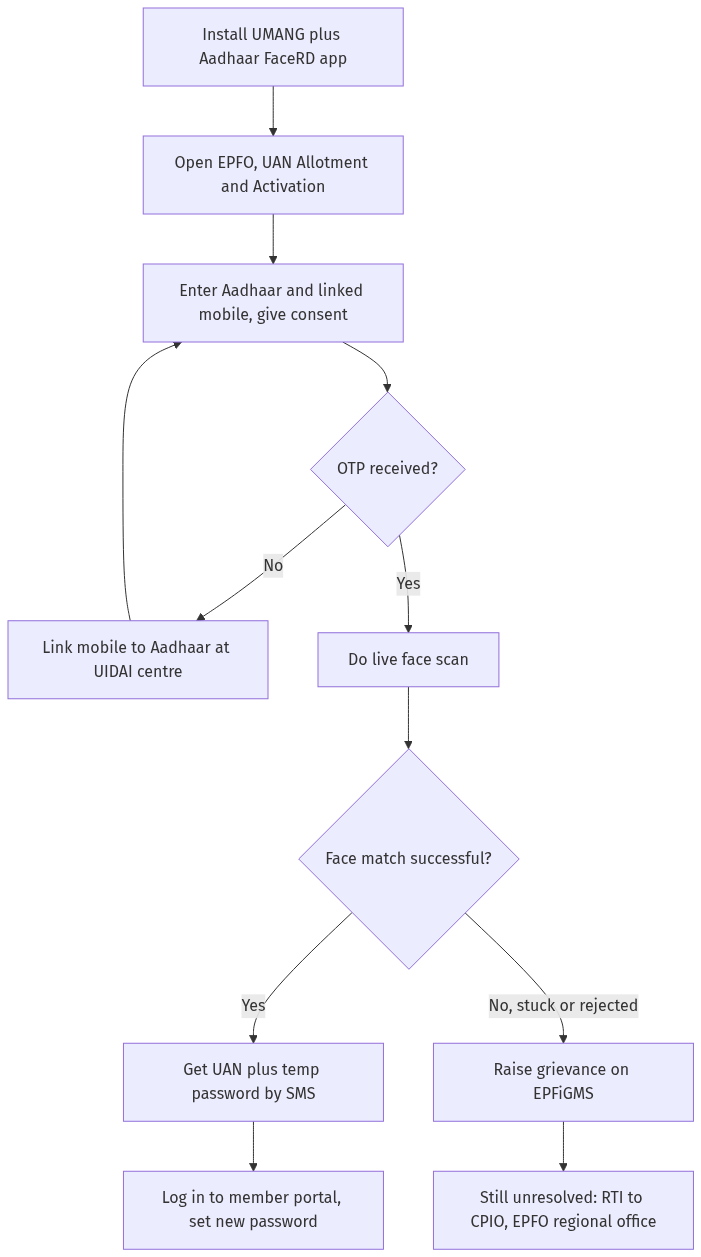
Figure: step-by-step flow. If a step stalls, use the grievance or RTI route shown.
Step 7: Log in and set a strong password
Now move to the EPFO member portal at unifiedportal-mem.epfindia.gov.in. Log in with your UAN and the temporary password, then change it to a strong password of your own. From here you can view your passbook, update KYC, and start a claim. If you ever need to withdraw your PF online, this is the portal you will use.
After activation: what you can do today
Activation is the gateway, not the destination. Once you are inside, these are the tasks worth doing in your first session:
- Check your KYC. Confirm that your Aadhaar, PAN, and bank account show as verified. Claims fail when KYC is incomplete.
- Open your passbook. Verify that every past employer's contribution is mapped to your UAN. A missing stretch usually means an old member ID has not been linked.
- Plan your pension paperwork. If you are nearing retirement, read how to file the EPS pension Form 10D and how to download your PPO once the pension is sanctioned.
If an old employer's PF has not merged into your activated UAN, and the employer is sitting on the transfer, our guide on what to do when an employer refuses PF transfer documents sets out your escalation. Members covered under medical insurance can also check their ESIC benefits and claims separately, as ESIC runs on its own insurance number, not your UAN.
If activation fails or you get stuck
Face authentication can stall for genuine reasons: a mismatch with an outdated Aadhaar photo, a mobile number that is no longer linked, or a UAN your employer entered with a wrong name or date of birth. Work through it in this order.
- Retry the scan in better light, and confirm the Aadhaar FaceRD app is installed and updated.
- Fix the root cause. If your name or date of birth is wrong, your employer must correct it; if your mobile is not linked to Aadhaar, update it at a UIDAI centre.
- Raise a grievance on the EPFO grievance portal, EPFiGMS at epfigms.gov.in. Pick the UAN related category, describe the exact error, and attach a screenshot. Note the resolution timeline shown on the portal and track your complaint number.
- Use RTI as the last lever. If the grievance is ignored, file an RTI application with the Central Public Information Officer of your concerned EPFO regional office, asking for the status and the reason for delay. A dated RTI often moves a stuck file faster than another reminder.
Frequently asked questions
Can I still activate my UAN on the EPFO website instead of UMANG?
The current mandated route is the UMANG app with Aadhaar face authentication, effective 1 August 2025. The website is now mainly where you log in after activation. If you see an “Activate UAN” option on the member portal, verify whether it is still operational on epfindia.gov.in before relying on it.
Do I need my employer to activate my UAN?
No. The face authentication flow lets you allot and activate your UAN yourself using only your Aadhaar, linked mobile number, and a face scan. Your employer is not in the loop for activation, though they remain responsible for depositing your contributions.
What if my mobile number is not linked to my Aadhaar?
The OTP step will fail. You must update your mobile number against your Aadhaar at a UIDAI enrolment or update centre, then restart the UAN activation in UMANG. There is no work around for the OTP, because it confirms it is really you.
I am an international worker or a citizen of Nepal or Bhutan. Does this apply to me?
The face authentication route is built around an Aadhaar identity. For international workers and citizens of Nepal and Bhutan, the employer can still generate the UAN through the established employer channel. Confirm the current procedure with your employer or your regional EPFO office.
My face scan keeps failing. What should I do?
Most failures are environmental. Scan in bright, even light, remove glasses or a mask, hold the phone steady at eye level, and make sure the Aadhaar FaceRD app is installed and updated. If it still fails, the photo in your Aadhaar record may be outdated, so consider updating it at a UIDAI centre.
How long is the temporary password valid?
EPFO sends a temporary password by SMS after a successful scan, and it is time sensitive. Log in and set your own password promptly. Verify the exact validity window shown inside the app, as it can change without notice.
Activation is done but my old PF is not showing. Why?
Activation only links accounts that already sit under your UAN. An older job's PF may carry a separate member ID that has not been merged. Raise an online transfer request from the member portal, and if your former employer blocks it, escalate through EPFiGMS and then RTI.