Withdraw PF Online 2026
Reviewed on 2026-06-20 by Dr. Shrawan Kumar Pathak.
Quick Reply: Log in at the EPFO member portal (unifiedportal-mem.epfindia.gov.in) with your UAN, confirm Aadhaar, PAN and bank KYC are “Digitally Approved”, then open Online Services and file Form 19 for full settlement or Form 31 for an advance. Aadhaar OTP signs it. Eligible advances up to Rs 5 lakh auto-settle in about 3 days.
This guide walks you through the EPFO member portal one screen at a time, so you know exactly what to click and what each box means. Keep your phone handy, because every claim is signed with an OTP sent to the mobile number linked to your Aadhaar.
Before you open the portal
Two minutes of checking here saves a rejected claim later. You need three things ready on the screen, not in your head.
Screen check 1: is your UAN active?
Your Universal Account Number (UAN) is the 12 digit key to everything. If you have never logged in, activate it first. Our companion walkthrough, how to activate your UAN, shows the exact activation screen. Once active, you log in at the member portal with the UAN and your password.
Screen check 2: is KYC "Digitally Approved"?
After you log in, click Manage, then KYC. You are looking for three rows: Aadhaar, PAN and Bank Account with IFSC. Each must show a green tick and the words “Digitally Approved” or “Verified”. If a row is blank or pending, your money has nowhere to land and the claim will fail. Seed the missing detail, let the employer or system approve it, and wait until the status flips to approved before you go further.
Screen check 3: is your mobile linked to Aadhaar?
The final claim screen sends a one time password to the mobile number registered with your Aadhaar at UIDAI. If that number is old or switched off, you cannot submit. Update it at an Aadhaar centre first if needed.
Pick the right form before you click
The portal offers one combined claim menu, but you must choose the correct form for your situation. Picking the wrong one is the most common reason a claim bounces back.
Form 19: full and final settlement
Use Form 19 when you have left the job and want your entire PF balance closed out. You can file it for full settlement after two months of unemployment or on retirement. Filing Form 19 closes that PF account, so only use it when you are truly done with the corpus.
Form 31: a partial advance
Use Form 31 when you are still employed (or recently unemployed) and need part of the money for a specific reason such as illness, your own or a child's education, marriage in the family, buying or repairing a house, or repaying a home loan. You stay a member and your account keeps running. After one month of unemployment you may also draw a large share of your balance as an advance; the exact percentage and any retention rule can change, so read the on screen note and verify the current limit on epfindia.gov.in.
Form 10C and Form 10D: the pension side
If your service is short and you want the pension portion back, that is Form 10C. If you have completed the qualifying service and want a monthly pension, that is Form 10D, covered in our guide to the EPS pension Form 10D. This article focuses on the PF money in Form 19 and Form 31.
File the claim screen by screen
With KYC green and the form chosen, the actual filing takes a few minutes.
- Log in at the EPFO member portal with your UAN and password.
- Click the Online Services tab, then choose Claim (Form-31, 19, 10C & 10D).
- The next screen shows your name, KYC details and service history. Enter the last four digits of your linked bank account in the box and click Verify to confirm it is yours.
- Click Proceed for Online Claim.
- From the dropdown, select the form you decided on: PF withdrawal (Form 19) or advance (Form 31).
- For an advance, pick the purpose, type the amount you need and your address. The system shows how much you are allowed to draw.
- Tick the certification box, request the Aadhaar OTP, type the OTP that arrives on your phone and submit.
That is the whole filing. You will see a claim reference on screen and a confirmation SMS. Note the reference number down.
Track the claim and know the timeline
Eligible advance claims up to Rs 5 lakh now flow through auto settlement, which EPFO processes by system within about three days without a human reviewing each one. This Rs 5 lakh limit was raised from Rs 1 lakh on 24 June 2025. Other claims are checked by an officer and usually take a few working days more.
To watch progress, log back in and open Online Services, then Track Claim Status. Each stage, from “Under Process” to “Settled” to the credit hitting your bank, shows there. The same status is available on the UMANG app if you prefer your phone.
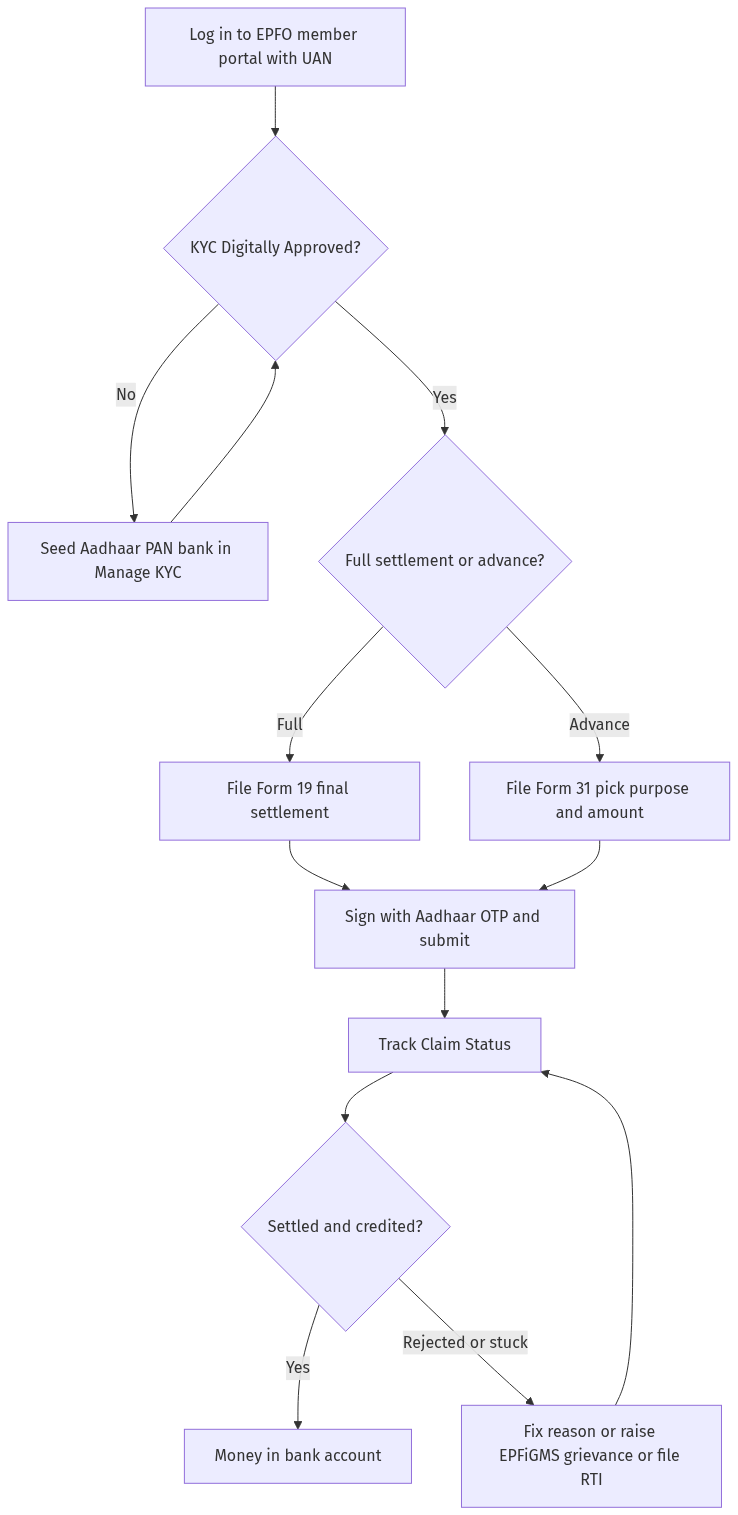
Figure: step-by-step flow. If a step stalls, use the grievance or RTI route shown.
If your claim is stuck or rejected
A rejection is not the end of the road. The status screen usually gives a reason, often a KYC mismatch, a wrong bank detail or a service gap your employer has not approved. Fix that exact point and refile.
If the money is genuinely stuck, raise a complaint on the EPFO grievance portal EPFiGMS at epfigms.gov.in. Quote your UAN and the claim reference, attach the rejection screenshot and describe the problem in plain words. If a previous employer is blocking your service record or transfer, our guide on what to do when an employer refuses PF transfer documents sets out your options. For a deeper dispute, including one that spills into pension fund territory, see how to handle an EPF or NPS withdrawal dispute. You can also file an RTI with the regional EPFO office asking the status and reason for delay of your claim reference; that often unblocks a file that has quietly stalled.
A note on the newer options you may have read about: EPFO has announced PF withdrawal through UPI apps and ATM style cards under its EPFO 3.0 upgrade. As of mid 2026 this is being rolled out and is not yet a live, all India facility for every member, so do not rely on it; check the current status on epfindia.gov.in before you plan around it.
Frequently asked questions
Do I need my employer to approve an online PF withdrawal?
For most claims, no. Once your KYC is digitally approved and Aadhaar is linked, you file and sign the claim yourself with an OTP and EPFO settles it. Employer approval is only an issue if your service record or transfer is incomplete, which you fix separately.
How long does the money take to reach my bank?
Eligible advance claims up to Rs 5 lakh auto-settle in about three days. Other claims are reviewed by an officer and typically take a few working days more. Track the exact stage on the Track Claim Status screen or the UMANG app.
What is the difference between Form 19 and Form 31?
Form 19 is a full and final settlement that closes your PF account, used after you leave a job. Form 31 is a partial advance for a specific need like illness, education, marriage or housing while you remain a member, so your account stays open.
My claim was rejected for a KYC mismatch. What now?
Open Manage then KYC, correct the detail that does not match your bank or Aadhaar records, wait until it shows “Digitally Approved” again, and refile the claim. The rejection reason on the status screen tells you which field to fix.
Can I withdraw my full PF while still employed?
No. Full settlement on Form 19 is for after you leave the job, on retirement, or after two months of unemployment. While employed you can only take a partial advance on Form 31 for an approved purpose.
Can I really withdraw PF through UPI or an ATM now?
EPFO has announced such facilities under EPFO 3.0, but as of mid 2026 they are still being rolled out and are not a guaranteed live option for every member. Use the member portal for now and verify the current status on epfindia.gov.in.
What if the portal keeps timing out or my OTP does not arrive?
Make sure the mobile number linked to your Aadhaar is active and has signal, then retry. If it still fails, raise a grievance on EPFiGMS with your UAN and a screenshot, or file an RTI with your regional EPFO office to get the claim moving.
Sources
Need related help? See activate your UAN, the EPS pension Form 10D guide, and what to do when an employer refuses PF transfer documents.
PF withdrawal online: EPFO claim process and common issues (2026)
Online PF withdrawal: EPFO claim process and troubleshooting (2026)
- What is online PF withdrawal and who is eligible? (a) Online PF withdrawal: (i) Withdraw EPF balance — through EPFO portal — without employer attestation, (ii) Available for: (1) EPF members — with UAN (Universal Account Number), (2) KYC verified — Aadhaar + PAN + bank account, (3) Mobile linked — with UAN — for OTP, (b) Withdrawal types: (i) Full withdrawal: (1) On retirement — age 58+, (2) On permanent incapacitation, (3) On migration from India, (4) On unemployment — 2+ months, (ii) Partial withdrawal: (1) Marriage — self/son/daughter — after 7 years, (2) Education — after 7 years, (3) Home purchase — after 5 years, (4) Home loan repayment — after 10 years, (5) Medical emergency — no minimum service, (6) Retrenchment/lockout — no minimum service, (iii) Pension withdrawal: (1) Form 10C — for pension withdrawal — after 10 years service, (2) Form 10D — for monthly pension — if eligible.
- How to withdraw PF online? (a) Step 1: Activate UAN: (i) Visit uan.epfindia.gov.in, (ii) Activate UAN — with UAN + member ID + mobile, (b) Step 2: Complete KYC: (i) Login to EPFO portal — with UAN + password, (ii) KYC → Aadhaar + PAN + bank account, (iii) Digitally approved — by employer — auto-verified with UIDAI, © Step 3: File claim: (i) Online Services → Claim (Form-31, 10C, 10D), (ii) Select claim type — full/partial withdrawal, (iii) Enter bank details + purpose + amount, (iv) OTP verification — on linked mobile, (d) Step 4: Claim processing: (i) EPFO processes — in 3-20 working days, (ii) Status: “Claim under process” → “Claim settled” → “Amount credited”, (e) Step 5: Check status: (i) Online Services → Claim Status, (ii) Or: EPFO app — UMANG.
- Comparison table: Online vs offline PF withdrawal. (a) Online: (i) Employer attestation: not needed — if KYC verified, (ii) Process: entirely online — portal + OTP, (iii) Timeline: 3-20 working days, (iv) Tracking: online — real-time, (v) Convenience: high — no office visit, (b) Offline: (i) Employer attestation: required — on composite claim form, (ii) Process: submit physical form — to EPFO office, (iii) Timeline: 15-30 days, (iv) Tracking: limited — no real-time, (v) Convenience: low — visit EPFO office. (Note: Online is faster + easier. Always prefer online — if KYC verified.)
- Common PF withdrawal issues and solutions. (a) Issue 1: KYC not verified: (i) Cause: Aadhaar/PAN/bank not linked — or employer not approved, (ii) Solution: (1) Update KYC on portal, (2) Request employer — to approve digitally, (3) If employer unavailable — get attestation from gazetted officer, (b) Issue 2: Name mismatch: (i) Cause: Name in EPF ≠ Aadhaar/PAN, (ii) Solution: (1) Submit joint declaration — with employer — to EPFO, (2) Or: file RTI — for name correction status, © Issue 3: Claim rejected: (i) Cause: (1) Wrong bank account/IFSC, (2) Insicient service for partial withdrawal, (3) Date of birth mismatch, (ii) Solution: correct details + refile, (d) Issue 4: Claim delayed beyond 20 days: (i) Solution: (1) File EPFiGMS grievance — epfigms.gov.in, (2) File RTI — for claim status + delay reason, (3) Contact EPFO — social media — Twitter @EPFOIndia.
- E-E-A-T signals. (a) Sources: epfindia.gov.in, pib.gov.in, (b) Last reviewed: July 2026.
- Practical tips. (a) Always use online withdrawal — if KYC verified, (b) Verify bank account + IFSC — before filing claim, © Check claim status — every 3 days — on portal, (d) File EPFiGMS + RTI — if delayed beyond 20 days, (e) Example: Member filed online withdrawal — Rs 3.2 lakh; status showed “under process” for 25 days; filed EPFiGMS + RTI; RTI reply revealed — bank IFSC mismatch; corrected IFSC; claim settled in 5 days — amount credited.
See PF Withdrawal Online and How to File RTI and RTI for EPF Delay.
Reader signal
Was this article useful?
Tap once if it helped you. These counters show other citizens which pages are worth reading.