NPS Withdrawal and Exit 2026

Reviewed on 2026-06-20 by Dr. Shrawan Kumar Pathak.
Quick Reply: To withdraw from NPS, log in to your CRA portal (Protean or KFin) or eNPS with your PRAN, raise the right exit request for your case, choose your lumpsum and annuity split, get your bank account verified, upload documents and authorise with OTP. Your POP or nodal office then approves it.
This is a step-by-step guide to actually filing an NPS withdrawal. It tells you which request to raise, what documents each case needs and how to track it. For the 2025 rule changes (the 80% lumpsum limit and deferment to age 85), read our separate NPS exit rules explainer. Here we stay on the process.
First, decide which case is yours
Your NPS exit is not one process. The form, the limits and the documents all change depending on why you are exiting. Use this simple test.
- If you have turned 60, completed 15 years (All Citizen Model) or reached superannuation then you take the normal exit route.
- If you want out before that then it is a premature exit, and most of your corpus must buy an annuity.
- If you only need part of the money and plan to stay invested then it is a partial withdrawal, not an exit.
- If the subscriber has died then the nominee or legal heir files a **death claim**.
Get this label right before you log in. Raising the wrong request is the most common reason an exit gets sent back.
If it is a normal exit (age 60 or superannuation)
This is the smoothest route. Here is the spine of the process.
Step 1: Log in and start the request
Open your CRA portal. Most subscribers use Protean (formerly NSDL) at the eNPS or CRA login; corporate and some government subscribers use KFin. Sign in with your PRAN and the one-time password sent to your registered mobile or email. Find the Exit/Withdrawal menu and start a normal exit (superannuation) request.
Step 2: Choose your lumpsum and annuity split
The portal will only let you pick within the limits that apply to you. In short, non-government subscribers can now take a larger lumpsum and government subscribers keep the older split. You do not need to memorise the slabs; the system enforces them and our exit rules explainer sets them out. If your total corpus is small, you may be offered a full lumpsum or a systematic payout instead of an annuity.
Step 3: Verify your bank account
The portal runs an instant bank account check (a penny-drop) on the account where your lumpsum will land. The name on the bank account must match your NPS records. A mismatch here stalls everything, so fix your name or bank details in CRA first if they differ.
Step 4: Pick your annuity provider
For the annuity portion you choose an Annuity Service Provider (ASP), an IRDAI-registered insurer empanelled with PFRDA, and an annuity option (for example, pension for life, or pension with return of purchase price to your nominee). Compare quotes inside the portal before you confirm. Your monthly pension begins once the ASP issues the policy.
Step 5: Upload documents and authorise
Upload the required proofs, then authorise the request with OTP or e-sign. For a normal exit you typically need:
- PRAN card or PRAN number
- Identity and address proof (KYC)
- Cancelled cheque or bank passbook showing your name, account number and IFSC
- A recent passport-size photograph
- The withdrawal form generated by the portal
Your request then moves to your POP, corporate, or nodal office for authorisation. Keep your acknowledgement or claim ID.
If it is a premature exit (before 60)
The process mirrors a normal exit, with two differences you must plan for. First, most of your corpus has to buy an annuity, so the ASP and annuity choice matter more. Second, All Citizen Model subscribers no longer face the old five-year wait, but you should confirm your case is eligible before you start. If your corpus is small you may qualify for a full lumpsum instead. Raise a premature exit request, not a normal one, or it will be rejected.
If you only need part of the money (partial withdrawal)
You do not have to exit to take some cash. A Tier I partial withdrawal lets you take up to 25% of your own contributions for specific needs such as medical treatment, a child's higher education or marriage, buying or building a house, or settling a loan taken against your NPS account. This is a separate request with its own limits and frequency rules. We cover it fully in our NPS partial withdrawal guide.
If you want a phased payout instead of one lumpsum
Rather than taking your whole lumpsum at once, you can opt for Systematic Lumpsum Withdrawal (SLW) and draw it in instalments while the rest stays invested. You set this up during exit. The mechanics, frequency and how it sits beside annuity are explained in our SLW guide.
If the subscriber has died (death claim)
The nominee or legal heir files the claim. The full corpus can be paid as a lumpsum, with an annuity only if the family wants one. Beyond the standard KYC and bank proofs, you will need the death certificate and, where there is no valid nomination, legal heir or succession proof. Start the death-withdrawal request in CRA or through the POP or nodal office, and expect extra verification, so keep originals ready.
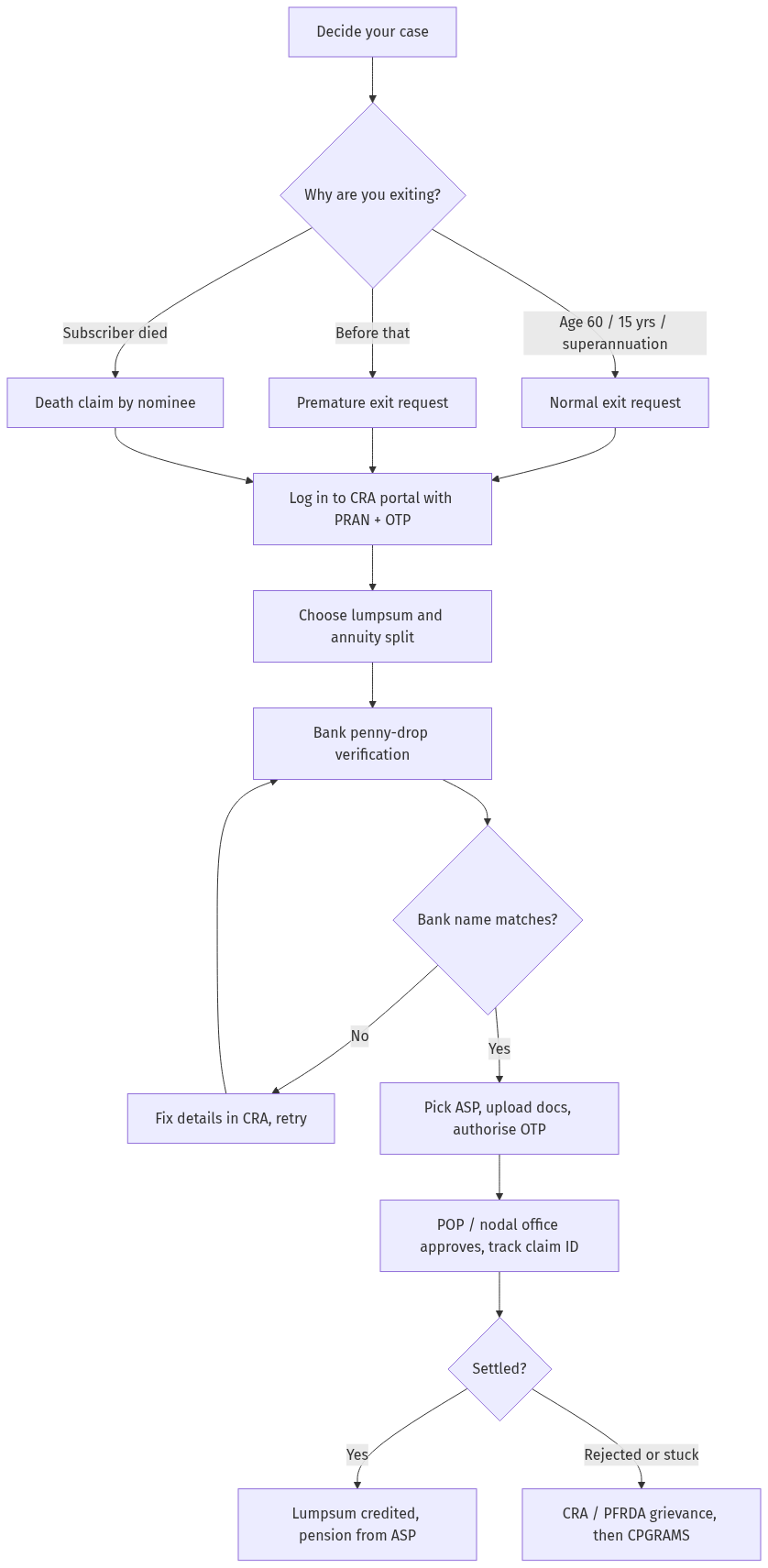
Figure: step-by-step flow. If a step stalls, use the grievance or RTI route shown.
Track it, and what to do if it gets stuck
After authorisation, your request sits with your POP or nodal office, then with the CRA for processing. Track the status inside the same portal using your claim ID; it usually settles in a few working days once authorised, though it can take longer if a document or bank detail is queried.
If your claim is rejected, delayed or simply not moving, do not just re-file. Raise a complaint through the CRA grievance module or PFRDA's grievance system, and escalate to CPGRAMS if there is no resolution. Our EPF and NPS withdrawal dispute guide gives you the exact escalation ladder and sample wording. For provident-fund exits, see our online PF withdrawal guide.
Frequently asked questions
Which portal do I use to withdraw my NPS?
You use your Central Recordkeeping Agency portal. Most subscribers are on Protean (formerly NSDL) and exit through eNPS or the CRA login; corporate and some government subscribers use KFin. Government subscribers may route the request through their nodal office. Your PRAN works the same way across them.
Do I have to buy an annuity?
It depends on your case and corpus. On a normal exit a part of the corpus normally buys an annuity, but a small corpus can be taken fully as lumpsum or as a systematic payout. On a premature exit the annuity share is larger. The portal shows exactly what your case allows.
How long does an NPS withdrawal take?
Once you authorise the request and your POP or nodal office approves it, processing usually takes a few working days. It can take longer if your bank verification fails or a document is queried. Track the live status with your claim ID inside the CRA portal rather than re-filing.
What if my bank verification fails?
The penny-drop check fails when the name or account number on your bank account does not match your NPS records. Correct the mismatch first, either your name and details in CRA or your bank account, then retry. The lumpsum can only be credited to a verified account in your name.
Can I withdraw part of my NPS without closing the account?
Yes. A Tier I partial withdrawal lets you take up to 25% of your own contributions for approved reasons such as medical needs, education, marriage, housing or settling a loan against your NPS, while the account stays open. See our partial withdrawal guide for the limits and frequency.
Who files the claim if the NPS subscriber has died?
The registered nominee files the death claim. If there is no valid nomination, the legal heir must claim with succession or legal heir proof. The corpus is generally paid as a lumpsum, and the family can choose an annuity if they wish.
My NPS withdrawal was rejected. What can I do?
First read the rejection reason in the portal and fix it, often a document or bank mismatch. If it is wrong or you get no response, raise a grievance through the CRA or PFRDA grievance system and escalate to CPGRAMS. Our dispute guide sets out the full ladder.
Sources
NPS exit rules explainer, partial withdrawal guide and withdrawal dispute guide cover the rules, the part-withdrawal route and the grievance ladder in depth.
EPF transfer online: Form 13 and UMANG guide (2026)
EPF transfer online: Form 13 and UMANG guide (2026)
- What is EPF transfer and when is it needed? (a) EPF transfer: (i) Transfer of PF balance — from previous employer to new employer, (ii) Needed when: (1) Change job — new PF account with new employer, (2) Multiple PF accounts — consolidate into one, (iii) Benefits: (1) Continuous accumulation — compounding benefit, (2) No withdrawal — tax benefit preserved, (3) Single account — easier tracking, (iv) Form 13: (1) EPF transfer form — for online transfer, (2) Can be filed on EPFO portal — or through employer.
- How to transfer EPF online? (a) Step 1: Activate UAN — at epfindia.gov.in — if not already, (b) Step 2: Login to EPFO portal — with UAN + password, © Step 3: Check KYC — Aadhaar, PAN, bank details — must be verified, (d) Step 4: Go to “Online Services” → “One Member - One EPF Account (Transfer O.P)”, (e) Step 5: Enter details: (i) Previous PF account — UAN + member ID, (i) New PF account — UAN + member ID, (iii) Select attestation mode: (1) Previous employer, (2) Current employer — whichever has digital signature, (f) Step 6: Submit — OTP verification, (g) Step 7: Employer attestation — selected employer verifies + approves, (h) Step 8: Transfer completed — balance credited to new account — SMS sent.
- Comparison table: EPF transfer vs EPF withdrawal. (a) EPF transfer: (i) Purpose: move balance to new employer, (ii) Tax impact: no tax — continuous service, (iii) Form: Form 13 — online, (iv) Timeline: 15-30 days, (v) Employer role: attestation required, (b) EPF withdrawal (full): (i) Purpose: withdraw balance — close account, (ii) Tax impact: taxable — if < 5 years service, (iii) Form: Form 19 — online, (iv) Timeline: 7-15 days, (v) Employer role: approval required, © EPF withdrawal (partial): (i) Purpose: withdraw partial — for specific needs, (ii) Tax impact: exempt — if conditions met, (iii) Form: Form 31 — online, (iv) Timeline: 7-15 days, (v) Employer role: approval required. (Note: Transfer is better than withdrawal — preserves tax benefit + compounding.)
- How to track EPF transfer status? (a) Online: (i) Login to EPFO portal — “Online Services” → “Track Claim Status”, (ii) View status: (1) Submitted, (2) Employer attestation pending, (3) EPFO processing, (4) Completed, (b) UMANG app: (i) Open UMANG → EPFO → Track Claim, (ii) Enter UAN + OTP — view status, © SMS: (i) Check SMS alerts — from EPFO — at each stage, (d) Grievance: (i) If delayed beyond 30 days — file grievance on EPFO portal, (ii) Or call CPSE-NRC — 1800118005.
- E-E-A-T signals. (a) Sources: epfindia.gov.in, pib.gov.in, (b) Last reviewed: July 202 provided by previous employer, (e) Example: Employee changed job; filed Form 13 online; previous employer attested in 5 days; transfer completed in 20 days; balance moved to new PF account.
See EPF Transfer and How to File RTI.
Reader signal
Was this article useful?
Tap once if it helped you. These counters show other citizens which pages are worth reading.