Book a Govt Hospital Appointment (ORS) 2026

Reviewed on 2026-06-20 by Dr. Shrawan Kumar Pathak.
Quick Reply: Go to ors.gov.in, click Book Appointment, pick your state, hospital and department, verify with an Aadhaar or mobile OTP (or your ABHA), choose a date, and download the OPD slip. It is run by the National Informatics Centre and takes only a few minutes.
Skip the queue: what ORS does
No more 5am queue outside the OPD window. The Online Registration System, ORS for short, links government hospitals across India under one portal so you can book your OPD slot from your phone. It is built by the National Informatics Centre. One login, many hospitals, including the AIIMS network.
You get three things on the same site: book an appointment, view lab reports, and check blood availability. This guide is the fast track. Read it once, book in minutes.
30-second prep
Before you touch the portal, line up four things so you do not stall mid-booking. One, the phone that gets your OTP, charged and in signal. Two, your Aadhaar number or your ABHA, whichever you will verify with. Three, your old UHID if you have visited that hospital before. Four, the patient's basic details: name, age, gender, and address. Have these on the table and the whole booking is a clean run, no fumbling halfway through and timing out on the OTP.
The 6-step speed run
Open the portal, then move fast.
- Open ors.gov.in. Use the official site only. Bookmark it.
- Click Book Appointment. The big button on the home page.
- Pick state, then hospital, then department. The list narrows as you click.
- Verify yourself. Enter your Aadhaar number or your registered mobile number, type the captcha, hit Get OTP, and key in the OTP. Got an ABHA? Use it for a faster check.
- Choose a free slot. Pick the date the calendar shows as open. Slots fill, so book early.
- Confirm and download the slip. Save or print the OPD slip as a PDF. That slip is your token.
Done. Carry the slip and a photo ID to the hospital on the day. Pay the small registration fee at the counter if your hospital charges one. Many government OPDs are free or charge a token amount, shown on your slip.
New patient vs follow-up
New patient? You need a registered mobile number or an ABHA. The portal creates your UHID, your unique hospital ID, the first time. Note it down.
Coming back? You are a follow-up. Use the same UHID or mobile number and book against your existing record. No fresh registration, faster booking.
Aadhaar, mobile or ABHA: pick one
You do not need all three. Aadhaar authenticates you cleanly. No Aadhaar? Your mobile number works. An ABHA health ID is the smoothest of the lot: it is free, a 14-digit number under the Ayushman Bharat Digital Mission, and it pulls your details so you skip retyping. The OTP always lands on the mobile linked to whichever route you choose, so keep that phone in hand.
If you store your IDs in DigiLocker or the mAadhaar app, you can read your Aadhaar number off your phone instead of digging for the card.
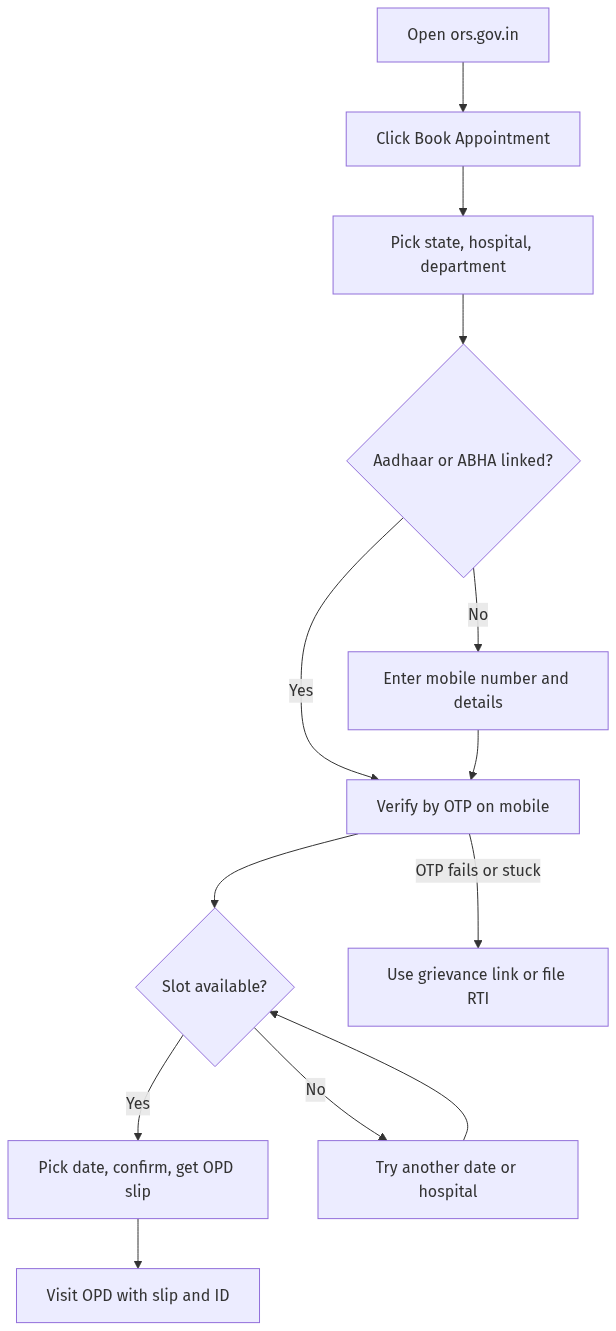
Figure: step-by-step flow. If a step stalls, use the grievance or RTI route shown.
How far ahead to book
ORS opens future dates, not same-hour walk-ins. How many days ahead you can book varies by hospital and department, so let the slot calendar guide you. Popular departments such as neurology, cardiology and orthopaedics fill first, often within minutes of the day opening. Open the calendar early in the morning, grab the first open date, and confirm before it goes. Verify the exact booking window on ors.gov.in for your chosen hospital, because each hospital sets its own limit.
Plan your travel around the slot, not the other way round. Reach the OPD ahead of your time, because online booking secures your registration, but the doctor still sees patients in order. Your slip and token decide your turn at the window.
Cancel or reschedule fast
Plans changed? Cancel so the slot frees up for someone else. On ORS, choose your state and hospital, then cancel by Appointment ID, UHID, or mobile number, and verify with an OTP. To reschedule, cancel and rebook a new date the same way.
Lab reports and blood, same login
While you are on ORS, you can also view lab reports for participating hospitals and check blood availability before you travel. No separate site, no second login.
When it jams: grievance or RTI
Three things go wrong most: the OTP never arrives, no slots show, or the slip will not download.
- OTP not arriving. Check signal, wait a minute, hit resend. Confirm the number is the one linked to your Aadhaar or ABHA.
- No slots. Try another date, another nearby government hospital, or open the calendar at the start of the booking day.
- Slip stuck. Note your Appointment ID and UHID from the confirmation, then download again later.
Still blocked or treated unfairly at the counter despite a valid booking? Raise a grievance on the national grievance portal at pgportal.gov.in, or file an RTI with the hospital's Public Information Officer asking the status of OPD registrations, slot allocation, or your specific Appointment ID. An RTI forces a written, dated reply.
Frequently asked questions
Do I need Aadhaar to book on ORS?
No. Aadhaar makes verification cleaner, but if you do not have one you can register and verify using your mobile number instead. Either way an OTP is sent to your phone to confirm your identity.
Is there a fee to book on ORS?
The booking itself is the OPD registration. Government hospital OPD fees are nominal and set by each hospital, and some are free. Your slip shows the amount, which you pay at the counter. Do not pay any third-party site that asks for a booking charge.
What is ABHA and do I have to make one?
ABHA is your Ayushman Bharat Health Account, a free 14-digit health ID under the Ayushman Bharat Digital Mission. It is optional, but linking it gives faster registration and keeps your health records in one place. You can apply for it separately.
Which hospitals are on ORS?
ORS links government hospitals across India, including the AIIMS network and many state and central institutions. Select your state on the portal to see the hospitals currently available for online booking.
Can I book for my parent or child?
Yes. Enter the patient's name, age and gender during booking, and use a mobile number you can receive the OTP on. The appointment is registered in the patient's name with their own UHID.
How do I cancel an ORS appointment?
On ors.gov.in, pick the state and hospital, choose to cancel by Appointment ID, UHID, or mobile number, then verify with the OTP sent to your phone. The freed slot goes back into the pool.
I booked but the hospital turned me away. What now?
Keep your OPD slip and Appointment ID as proof. Raise a grievance on pgportal.gov.in, and if you need an official record, file an RTI with the hospital asking why a valid online appointment was not honoured.
Sources
Need your IDs handy first? Set up the mAadhaar app, keep an Aadhaar PVC card as backup, and store documents in DigiLocker so booking takes minutes, not hours.
Reader signal
Was this article useful?
Tap once if it helped you. These counters show other citizens which pages are worth reading.