Lock / Unlock Your Aadhaar Biometrics 2026

Reviewed on 2026-06-20 by Dr. Shrawan Kumar Pathak.
Quick Reply: Your fingerprint can be silently used to open accounts or draw money. Lock it free on the myAadhaar portal (myaadhaar.uidai.gov.in) or the mAadhaar app using an OTP on your registered mobile. Once locked, any biometric attempt fails with error 330. Unlock temporarily whenever you genuinely need eKYC.
The problem nobody warned you about
You hand over your Aadhaar at a shop, a property registrar, a SIM counter, a ration shop. You press your thumb on a little black scanner and walk away. You assume the scan vanished. It did not have to.
Your fingerprint is a password you can never change. If a single operator captures a clean print, or a leaked database surfaces, that print can be replayed against the Aadhaar authentication system to approve things in your name: a fresh bank account, a loan, a payout from a government scheme, a new connection. You will not get an SMS asking permission. The first you hear of it may be a recovery notice or a frozen account.
This is the gap most people never close. The fix is one switch, it is free, and it has existed for years. Most citizens simply do not know the switch is there.
Agitate: why a leaked thumbprint is worse than a stolen card
Lose your Aadhaar card and you can order a reprint. Lose control of your biometric and there is no reissue. You cannot grow a new fingerprint.
The damage compounds quietly. Biometric Aadhaar authentication is accepted across banking, telecom, pension and welfare counters. An attacker does not need your OTP or your password. They need a usable copy of your print and a willing or careless operator. Because the system trusts the biometric itself, a successful match looks completely legitimate on every record. You are left arguing that it was not you, with the paperwork all saying it was.
If you have ever felt that helpless prickle when a stranger took your thumb impression, that instinct was correct. The next section turns it into action.
Solve: lock your biometrics today
UIDAI offers two separate safety switches. Pick the one that matches your worry.
Biometric lock (the everyday shield)
This locks your fingerprint, iris and face for authentication while leaving demographic and OTP services working. It is the right default for most people, because it blocks silent fingerprint misuse without freezing your whole Aadhaar.
- Open myaadhaar.uidai.gov.in in a browser, or open the mAadhaar app on your phone.
- Choose the Lock / Unlock Aadhaar (biometrics) service and tick the consent box.
- Enter your 12-digit Aadhaar number and the security captcha, then request an OTP.
- Type the OTP that arrives on your registered mobile number and confirm Lock.
- You get an on-screen confirmation and an SMS. From now on, any biometric attempt against your Aadhaar fails and the device shows error code 330, meaning biometrics are locked.
A registered mobile number is essential. No linked mobile means no OTP, so you must visit an enrolment centre or Aadhaar Seva Kendra first to add one.
Aadhaar (UID) lock, the heavier shutter
This is stronger and stricter. When you lock the UID, you cannot perform any authentication at all using your UID, UID token or VID, across biometric, demographic and OTP. Use it only when you want your Aadhaar completely dormant for a while.
There is a catch built in: to lock the UID you first need a 16-digit Virtual ID (VID). UIDAI makes the VID a pre-requisite so that your raw Aadhaar number is never exposed during the lock. Generate a VID on the myAadhaar portal, or text GVID followed by the last 4 or 8 digits of your Aadhaar to 1947. Forgot your VID? Text RVID with the last 4 or 8 digits to 1947 to have it resent.
With the VID in hand, open the Lock / Unlock service, choose UID Lock, enter your Aadhaar number, full name and PIN code, complete the security code, request OTP or use TOTP, and submit.
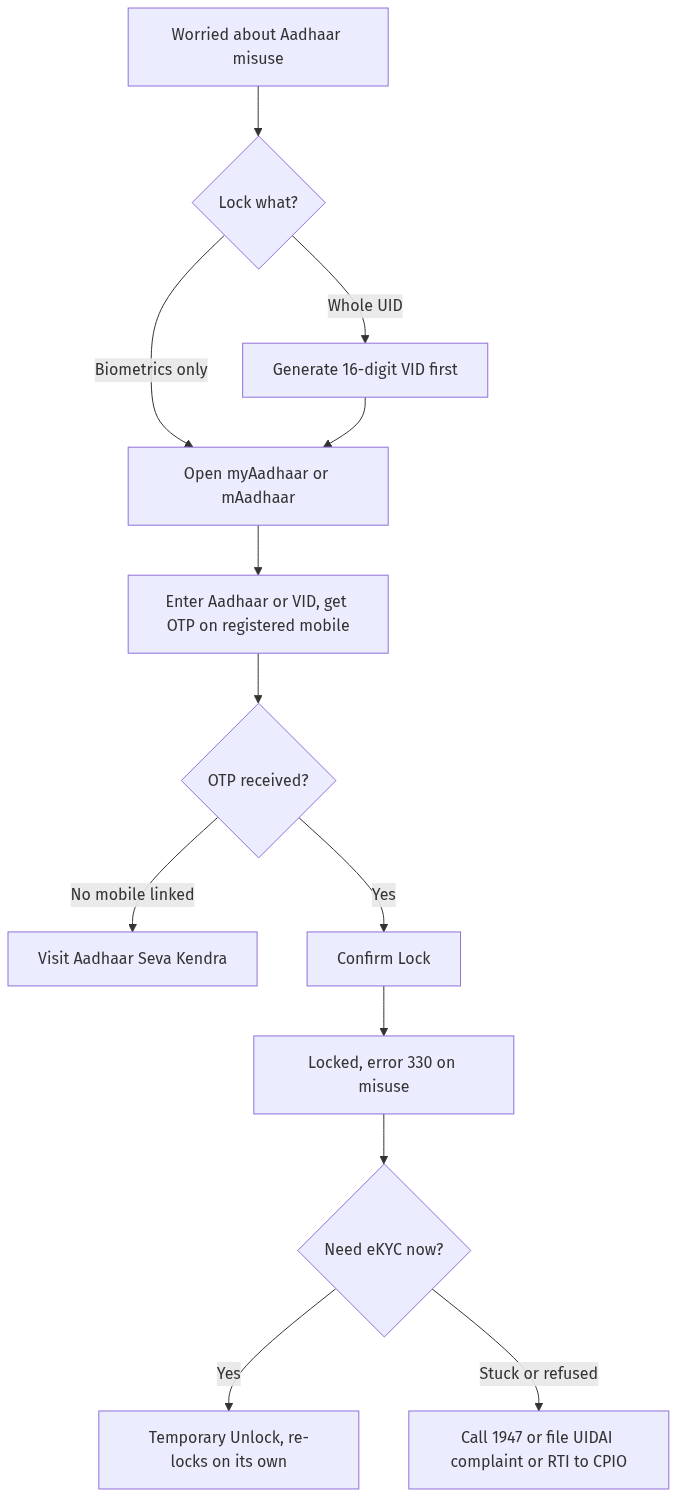
Figure: step-by-step flow. If a step stalls, use the grievance or RTI route shown.
Unlock only when you truly need it
Locking is not a one-way door. When a bank or registrar genuinely needs your live biometric or eKYC, unlock for that moment.
For biometrics, open the same service on myAadhaar or mAadhaar, choose Unlock, verify with an OTP, and your biometrics open up. This unlock is temporary: it re-locks on its own after a short window, so you do not have to remember to switch it back. The exact auto re-lock window is shown on the portal, so verify the current window on myaadhaar.uidai.gov.in before you start your eKYC.
To unlock the UID, you must supply your latest 16-digit VID, enter the security code and confirm with OTP or TOTP. Keep your current VID handy, because an old VID will not work.
If you would rather not toggle at all, you can keep biometrics locked permanently and simply unlock for the rare eKYC, or disable the locking system entirely from the same screen.
When the switch will not cooperate
The usual blocker is the mobile number. If the OTP never arrives, your registered mobile is probably old or wrong. You cannot fix that online, you must update your mobile at an enrolment centre or Aadhaar Seva Kendra, then return to lock. You can also keep a quiet eye on misuse by reviewing your own usage in our guide to Aadhaar authentication history, which lists who recently authenticated against your Aadhaar.
If the portal errors out, the OTP loops, or an operator refuses to honour your locked status, do not let it slide. Call the UIDAI helpline 1947, raise a complaint through the file-a-complaint option on the UIDAI portal, or email [email protected]. If you need a written, accountable reply, you can file an RTI to the UIDAI Central Public Information Officer asking for the status and reason for your request.
To set up the phone tools you will rely on, see our walkthroughs for the mAadhaar app setup and the Aadhaar Virtual ID, since the VID is mandatory for the heavier UID lock. Keep a backup of your Aadhaar with the Aadhaar PVC card and store it digitally using the DigiLocker guide so a locked biometric never leaves you without proof of identity.
Frequently asked questions
Does locking my Aadhaar biometrics cost anything?
No fee is charged for locking or unlocking biometrics online on the myAadhaar portal or the mAadhaar app. It is a free self-service. If a kiosk or agent demands money to do it for you, you are being overcharged, do it yourself with your registered mobile.
Will a locked biometric stop my bank or SIM eKYC?
Yes, while locked, any biometric authentication fails with error 330. That is the point. When you genuinely need eKYC, simply unlock for that moment, complete the verification, and let it re-lock automatically.
What is the difference between biometric lock and UID lock?
Biometric lock blocks only fingerprint, iris and face, while your demographic and OTP services keep working. UID lock is stricter and blocks every form of authentication using your UID, UID token and VID. Most people only need biometric lock.
Why do I need a VID to lock my UID?
UIDAI makes the 16-digit Virtual ID a pre-requisite for UID lock so your actual Aadhaar number stays shielded during the process. Generate or retrieve a VID on myAadhaar or by texting 1947 before you start.
How long does a temporary unlock last?
A temporary unlock stays open only for a short window and then re-locks on its own, so you never have to remember to switch it back. The exact window is shown during the process, so verify the current duration on myaadhaar.uidai.gov.in.
I never get the OTP. What now?
That means no working mobile number is linked to your Aadhaar. Online lock needs an OTP, so visit an enrolment centre or Aadhaar Seva Kendra to update your mobile number first, then lock from home.
My biometrics were misused. Can locking undo it?
Locking prevents future misuse, it does not reverse a past transaction. Lock immediately to stop further damage, then report the misuse to the relevant bank or service and to UIDAI on 1947, and ask for a written reply through a complaint or an RTI.
Sources
Aadhaar lock/unlock: Biometric and OTP lock guide (2026)
- Step 1: What is Aadhaar lock/unlock and why use it? (a) Aadhaar lock: (i) UIDAI feature — lock biometric data (fingerprint/iris) or Aadhaar number, (ii) prevents misuse — unauthorized authentication blocked, (iii) two types: (A) Biometric Lock — locks fingerprint/iris, (B) Aadhaar Number Lock — locks Aadhaar number itself, (b) unlock: (i) temporary unlock via OTP — 10 minutes for biometric, (ii) permanent unlock via mAadhaar/UIDAI portal, © authority: UIDAI, (d) law: Aadhaar Act 2016 + UIDAI regulations.
- Step 2: Comparison table — lock/unlock scenarios. (a) Biometric lock: (i) use: prevent unauthorized biometric auth, (ii) method: SMS LOCK<space>Aadhaar last 4 digits to 1947 or mAadhaar, (iii) unlock: UNLOCK<space>last 4 to 1947 — 10 min unlock, (iv) timeline: instant, (v) example: locked biometrics; unlocked for bank KYC in 10 min, (b) Aadhaar number lock: (i) use: prevent Aadhaar number sharing/misuse, (ii) method: UIDAI portal + VID, (iii) unlock: generate new VID, (iv) timeline: instant, (v) example: locked Aadhaar; used VID for verification, © OTP lock: (i) use: prevent OTP-based auth, (ii) method: mAadhaar app, (iii) unlock: mAadhaar, (iv) timeline: instant, (v) example: locked OTP; unlocked for PF withdrawal, (d) Temporary unlock: (i) use: one-time authentication, (ii) method: SMS UNLOCK — 10 min window, (iii) re-lock: auto after 10 min, (iv) timeline: 10 min, (v) example: unlocked for SIM verification; auto-locked after 10 min, (e) Permanent unlock: (i) use: permanently enable biometrics, (ii) method: mAadhaar or UIDAI portal, (iii) timeline: instant, (iv) caution: biometrics exposed until re-locked, (v) example: permanently unlocked; re-locked after use. (Note: Lock biometrics when not in use — unlock via SMS to 1947 for 10 min when needed.)
- Step 3: How to lock/unlock Aadhaar biometrics. (a) Step 1: Send SMS LOCK<space>Aadhaar last 4 digits to 1947, (b) Step 2: Receive OTP on registered mobile, © Step 3: Send OTP to 1947 — biometrics locked, (d) Step 4: To unlock — send UNLOCK<space>last 4 to 1947, (e) Step 5: 10 min unlock window — use for authentication, (f) Step 6: Auto re-lock after 10 min.
- Step 5: Practical tips. (a) lock biometrics — SMS to 1947, (b) use VID instead of Aadhaar number, © unlock only when needed — 10 min window, (d) mAadhaar app — easiest method, (e) Example: A citizen locked biometrics after Aadhaar fraud; unlocked only for bank KYC; re-locked automatically.
- Step 6: Key provisions. (a) Aadhaar Act 2016, (b) UIDAI Regulations 2016, © SMS 1947: lock/unlock, (d) mAadhaar: mobile app, (e) VID: virtual ID.
See Aadhaar Lock and Child Biometric and RTI Aadhaar Delay and How to File RTI.