Aadhaar Virtual ID (VID): Use It 2026

Reviewed on 2026-06-20 by Dr. Shrawan Kumar Pathak.
Quick Reply: A Virtual ID, or VID, is a temporary 16-digit number that stands in for your Aadhaar number. Generate it free on the UIDAI myAadhaar portal, the mAadhaar app, or by texting GVID and your last 4 Aadhaar digits to 1947 from your registered mobile.
This guide is built term by term. Each piece of jargon you will meet at a bank counter or KYC form is defined once, then used. Learn the words, and the VID process stops being confusing.
The words you need first
Aadhaar number
Your Aadhaar number is the permanent 12-digit number on your Aadhaar letter or card. It never changes. The whole point of a VID is to avoid handing this number out.
Virtual ID (VID)
A Virtual ID (VID) is, in UIDAI's own words, “a temporary, revocable 16-digit random number mapped with the Aadhaar number.” Temporary means it can be replaced. Revocable means you can throw it away and make a new one. Mapped means it is silently linked to your Aadhaar in the background.
The privacy gain is one-way maths. UIDAI states “it is not possible to derive Aadhaar number from VID.” So a shop, telecom outlet or app that holds your VID cannot work backwards to your Aadhaar number.
Registered mobile number
Your registered mobile number is the phone number saved in your Aadhaar record. This single fact decides everything below. Every method of getting a VID sends the result, or an OTP, to this number. No registered number means no VID, full stop.
e-KYC and authentication
Authentication is when a service checks that you are you by sending your details to UIDAI. e-KYC is the same check that also pulls your name, photo and address. A VID works for both, exactly the way your Aadhaar number would. The clerk feeds the 16-digit VID instead of your 12-digit Aadhaar, and the verification runs the same.
AUA and KUA
An AUA or KUA is an agency licensed to run Aadhaar checks, like a bank or a SIM seller. Worth knowing because UIDAI is firm here: no AUA, KUA or any other entity can make a VID for you. You, the Aadhaar holder, are the only person who can generate it.
Why use a VID at all
Think of your Aadhaar number as your house key and the VID as a single-use visitor pass. Hand the pass to a stranger and they get in once, then it expires when you swap it. Hand over the real key and they keep a copy forever.
Use a VID whenever you must show Aadhaar but do not trust the counter to store your real number safely: a new mobile SIM, a hotel check-in that demands ID, a courier or gas connection, a fintech app's KYC screen. The verification still passes, but your 12-digit number stays private.
One rule to remember: only one VID is valid at a time. The moment you generate a fresh VID, the previous one stops working. So after a sensitive transaction, generating a new VID quietly cancels the old one you just shared.
Three ways to generate or retrieve your VID
All three need your registered mobile number to be live in your hand, because each sends an OTP or the VID itself to that number.
Method 1: SMS, no internet needed
From your registered mobile, send a plain text to 1947:
- To generate a VID, text: GVID followed by a space and the last 4 digits of your Aadhaar. Example: GVID 9123
- To retrieve the VID you already have, text: RVID followed by a space and the last 4 digits. Example: RVID 9123
UIDAI replies with your 16-digit VID by SMS. This is the route for a basic phone or a dead internet connection.
Method 2: myAadhaar portal
Open the UIDAI VID Generator at myaadhaar.uidai.gov.in, choose the Virtual ID (VID) Generator service, enter your Aadhaar number and the captcha, and verify the OTP sent to your registered mobile. Pick “Generate VID” for a new one or “Retrieve VID” to see your current one. The 16 digits appear on screen and arrive by SMS.
Method 3: mAadhaar app
Inside the mAadhaar app, the same Generate VID and Retrieve VID options sit under your profile. If you have not set the app up yet, our mAadhaar app setup guide walks you through registering your Aadhaar on the phone first.
Generating or retrieving a VID is free through every method. UIDAI does not charge for online Aadhaar services, so do not pay any agent who claims otherwise. If a figure or fee is ever quoted to you, verify the current position on uidai.gov.in.
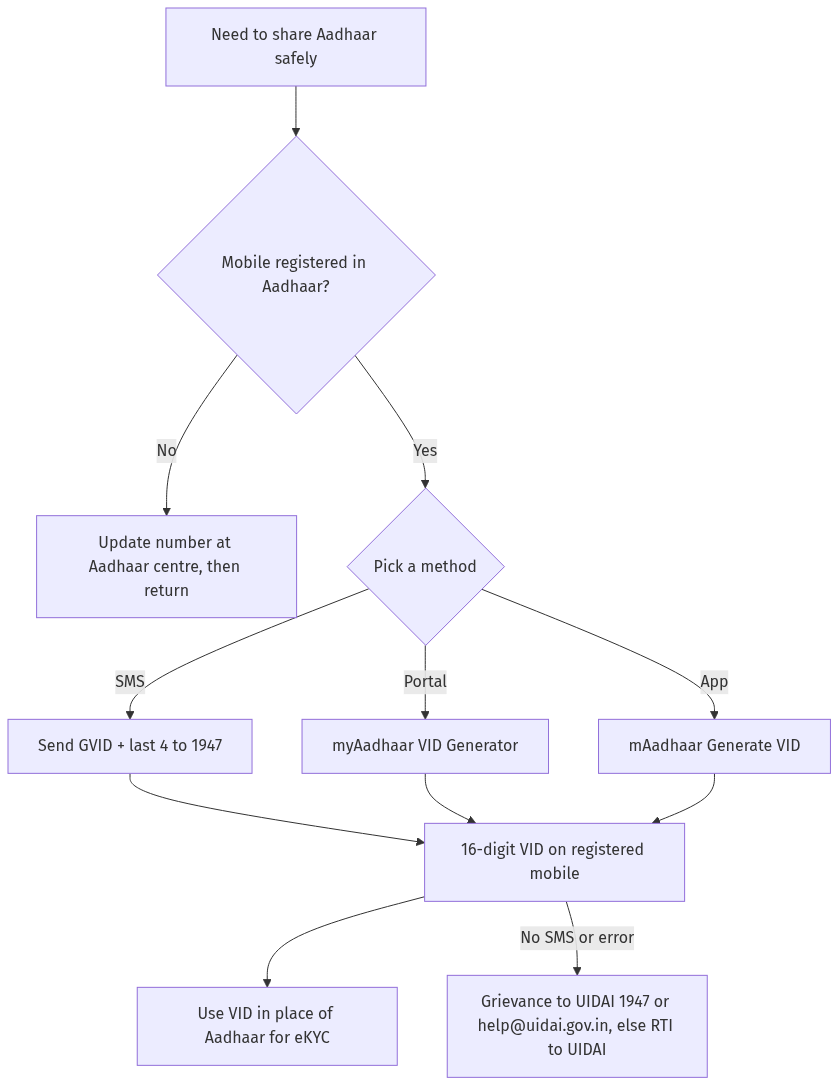
Figure: step-by-step flow. If a step stalls, use the grievance or RTI route shown.
If the VID does not arrive or is rejected
The single biggest blocker is a wrong or missing registered mobile number. If 1947 sends nothing, or the portal says no OTP can be delivered, your number is almost certainly out of date. You cannot fix this fully online. Visit an Aadhaar Seva Kendra or enrolment centre with your Aadhaar, update the mobile number with a biometric scan, wait for it to reflect, then try the VID steps again.
If your mobile is correct and the VID still fails, raise a grievance with UIDAI on 1947 or by email at [email protected], or use the File a Complaint option on the UIDAI grievance portal. As a last resort, because UIDAI is a public authority, you can file an RTI asking the status of your request and the reason for the failure.
While you have Aadhaar open, two neighbours of the VID are worth a look: you can lock and unlock your Aadhaar biometrics to block misuse, and you can check your Aadhaar authentication history to see where your identity has been used. For a tamper-proof physical card, see how to order an Aadhaar PVC card, and store the e-copy safely with DigiLocker.
Frequently asked questions
What is an Aadhaar Virtual ID in plain words?
It is a temporary, revocable 16-digit number that you can give in place of your real Aadhaar number. It passes the same e-KYC and authentication checks, but no one can work out your Aadhaar number from it.
Is generating a VID free?
Yes. UIDAI provides VID generation and retrieval free through the myAadhaar portal, the mAadhaar app and SMS to 1947. Never pay an agent for it. Verify any quoted charge on uidai.gov.in.
What is the SMS format to get my VID?
From your registered mobile, text GVID and a space and the last 4 digits of your Aadhaar to 1947 to generate a new VID. Text RVID and the last 4 digits to 1947 to retrieve your existing VID.
Can someone else generate a VID for me?
No. UIDAI is clear that only the Aadhaar number holder can generate a VID. No bank, SIM seller or other agency, called an AUA or KUA, can create it on your behalf.
How long does a VID stay valid?
At any time only one VID is valid for your Aadhaar number, and a new VID replaces the old one. The exact minimum validity window can change, so verify the current rule on uidai.gov.in before you rely on a long-stored VID.
I did not receive my VID by SMS. What now?
This usually means your registered mobile number is wrong or missing. Update it at an Aadhaar centre, then try again. If the number is correct, raise a grievance on 1947 or [email protected], and file an RTI with UIDAI if there is still no response.
Can I use a VID everywhere Aadhaar is asked?
You can use a VID wherever Aadhaar-based authentication or e-KYC is accepted, such as new SIMs, bank KYC and many app verifications. The verification runs identically to using the Aadhaar number itself.