How to Add or Change a Bank Nominee 2026
RBI Ombudsman as of 1 July 2026: Bank, certain NBFC, prepaid-instrument and credit-information complaints go under the Reserve Bank - Integrated Ombudsman Scheme, 2026, which replaced RB-IOS 2021 from 1 July 2026. First complain to the entity. If there is no reply in 30 days (or the longer NPCI/card-network window, if it applies) or you reject the reply, file free at cms.rbi.org.in within 90 days. The Ombudsman can award up to Rs 30 lakh for consequential loss and up to Rs 3 lakh for time, expenses and harassment. Complaints received before 1 July 2026 stay under the 2021 scheme. Source: RBI FAQ, updated 1 July 2026 and the RB-IOS 2026 FAQ PDF dated 1 July 2026.

Reviewed on 2026-06-20 by Dr. Shrawan Kumar Pathak.
Quick Reply: To add or change a bank nominee, fill the Nomination Form at your branch or use your bank's e-nomination in netbanking. Since 1 November 2025 you can name up to four nominees. To change one, simply file a fresh nomination: it cancels the old one. Always keep the bank's written acknowledgement.
A nominee is the person your bank pays your deposit to if you die. Naming one, and keeping it current, is the single cheapest thing you can do to spare your family months of paperwork later — our guide to claiming a deceased person's bank money shows the alternative your family faces without one. This guide gives you the exact 2026 procedure, what changed under the new rules, and what to do if the branch drags its feet.
What changed in 2025
The Banking Companies (Nomination) Rules, 2025 (Gazette notification G.S.R. 790(E), dated 27 October 2025) came into force on 1 November 2025 and replaced the old 1985 rules. Two practical changes matter to you.
First, you can now name up to four nominees for one deposit account, not just one (our 2025 multiple-nominee rules explainer has the detail). Second, banks may now let you nominate, change or cancel online through netbanking or the mobile app, where the bank has built that facility.
Simultaneous or successive: which to pick
For a deposit account you choose how your four nominees work:
- Simultaneous. More than one nominee is active at the same time, each with a fixed share that you specify. The shares must add up to 100 per cent. Good for splitting a deposit between, say, two children.
- Successive. You set a priority order. The second nominee becomes active only if the first has died, and so on. Good when you want one main nominee with backups.
For a safety locker or articles in safe custody, only the successive order is allowed. Disputes over access after death have their own recovery route — see bank locker access and nomination disputes.
How to add a nominee: the steps
Step 1: Get the Nomination Form
Ask your branch for the Nomination Form, or download it from your bank's website. Under the 2025 rules there is now one combined form that covers nomination, cancellation and variation, so you do not need to hunt for separate forms. If your bank offers e-nomination, you can skip paper entirely and do it in netbanking.
Step 2: Fill in the nominee details
Write each nominee's full name, relationship, address and date of birth. If you are using the simultaneous option, write each person's share so the total is 100 per cent. If a nominee is a minor, you must also appoint an adult to receive the money on the minor's behalf.
Step 3: Sign and submit
For a single-holder account, you sign alone. For a joint account, all the depositors must sign together: a nomination, change or cancellation on a joint account is not valid unless every holder signs. Submit the form at the branch, or complete the e-nomination online.
Step 4: Collect your acknowledgement
The bank must give you a written or electronic acknowledgement that it has registered your nomination. This is your proof. Save it. If the branch takes the form but gives you nothing in writing, ask for a stamped, dated acknowledgement before you leave the counter.
Step 5 (online route): finish the e-nomination
If you nominate through internet or mobile banking, the rules require two-factor authentication to confirm it is really you. Complete the OTP or other second step, then download the on-screen confirmation. Doing it in netbanking is the easiest way to verify your nominee is recorded, so log in and check the nominee field after a day or two.
How to change or cancel a nominee
You do not need a special change form. Under the 2025 rules, to change a nominee you simply file a fresh nomination. Every new nomination automatically cancels and replaces the earlier one. If a wrong name has been recorded against your account, our guide to correcting a wrongly registered nominee walks through it. To remove a nominee without naming a new one, submit a cancellation through the same form or e-nomination.
A few points worth knowing:
- Your nomination does not lapse just because a fixed deposit is renewed. It carries over.
- You can ask the bank to extend the same nomination to your other accounts in that bank, so you do not repeat the exercise per account. (Separate rules govern nominees in demat and mutual funds, which sit outside the Banking Companies Rules.)
- On a joint account, again, every holder must agree to the change.
If you have a locker, the rules differ slightly on access and there are RBI norms on locker agreements worth reading. See our guide on bank locker rules in 2026.
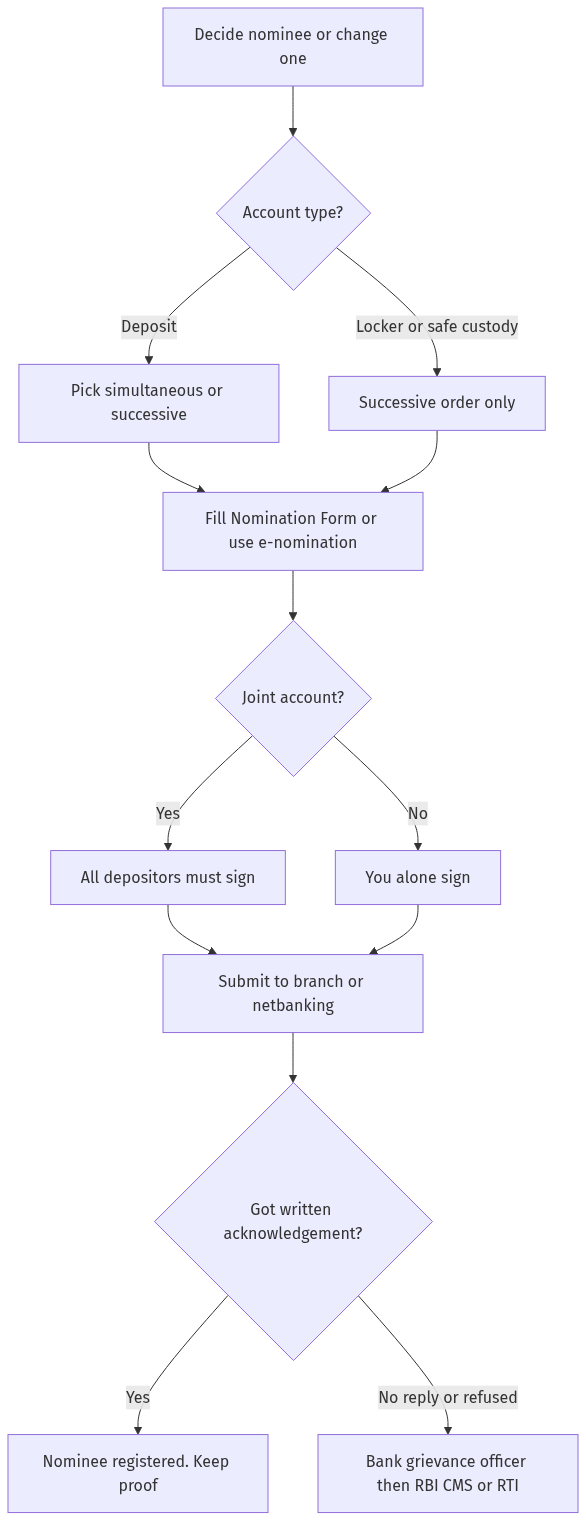
Figure: step-by-step flow. If a step stalls, use the grievance or RTI route shown.
If the branch stalls or refuses
A nomination request should be a counter job, not a project. If the branch loses your form, refuses to register it, or will not give an acknowledgement:
- Put your request in writing and get it date-stamped, or send it by email so you have a record.
- Escalate to the bank's grievance / nodal officer, named on the bank's website, and ask for a complaint reference number.
- If there is no proper reply within 30 days, raise it with the RBI Banking Ombudsman through the complaint portal at cms.rbi.org.in.
For a public-sector bank you can also lodge a grievance on the central government portal. Our walkthrough on how to file a CPGRAMS grievance shows the exact route.
A registered nominee is not the same as legal ownership: it lets the bank pay out quickly, but heirs can still claim under succession law. If there was no nominee and a depositor has died, the family faces a different process and may need a legal heir certificate. Where a nominee exists but the bank delays a deceased-account payout, read our related guide on a delayed deceased-account claim.
Frequently asked questions
How many nominees can I add to a bank account in 2026?
Up to four, since 1 November 2025. For a deposit account you can make them simultaneous, each with a fixed share totalling 100 per cent, or successive, in a priority order. For a locker or safe-custody articles, only the successive order is allowed.
Is there a fee to add or change a bank nominee?
Most banks do not charge for registering, changing or cancelling a nomination. Charges are not fixed by the rules, so confirm the current position with your own bank before you assume it is free.
Can I add a nominee online?
Yes, if your bank offers e-nomination. You can nominate, change or cancel through netbanking or the mobile app. The rules require two-factor authentication for the app or internet route, so be ready with your OTP, then save the on-screen confirmation.
Do all holders of a joint account have to sign?
Yes. On a joint deposit, any nomination, change or cancellation is valid only if every depositor signs it together. One holder cannot add or remove a nominee on a joint account alone.
What happens if I name a minor as nominee?
You can name a minor, but you must also appoint an adult, who is not a minor, to receive the deposit on the minor's behalf if you die while the nominee is still a minor. Write that guardian's details on the same form.
Does the nominee become the owner of my money?
No. A nominee is a trustee who can collect the money quickly from the bank. Legal ownership still follows your will or succession law, and heirs can claim their share from the nominee.
How do I change a nominee I added earlier?
File a fresh Nomination Form or e-nomination naming the new person. Under the 2025 rules every new nomination automatically cancels the old one, so there is no separate change form. Keep the new acknowledgement as proof.
The branch will not register my nominee. What can I do?
Submit the request in writing and get a dated acknowledgement, then escalate to the bank's grievance officer with a complaint number. If you get no proper reply within 30 days, complain to the RBI Banking Ombudsman at cms.rbi.org.in.
Sources
Bank nominee name missing or incorrect: How to update or add a nominee?
When your bank account or locker has no nominee or the nominee name is incorrect, here is the complete guide:
- Step 1: Why a nominee matters. (a) a nominee is the person who receives the bank deposit/locker contents after the account holder's death, (b) without a nominee: the family must produce: (i) a succession certificate, (ii) a legal heir certificate, (iii) an indemnity bond — this takes months, © with a nominee: the bank pays the nominee within 30 days of the death certificate submission, (d) the nominee holds the money in trust for the legal heirs (the nominee is not necessarily the owner).
- Step 2: How to add a nominee. (a) visit the bank branch (or use net banking if available), (b) fill Form DA1 (for bank accounts) or Form DA2 (for lockers), © provide: (i) the nominee's name, (ii) the nominee's date of birth, (iii) the nominee's address, (iv) the relationship with the nominee, (d) the bank updates the records and issues a confirmation, (e) you can add up to 4 nominees with percentage share (as per RBI 2024 guidelines).
- Step 3: How to update/change a nominee. (a) fill Form DA3 (for modification) or DA1 again (for a fresh nomination), (b) provide the reason for change (e.g., marriage, death of previous nominee), © submit the form at the branch, (d) the bank updates the records and issues a confirmation, (e) you can change the nominee any number of times (no fee).
- Step 4: Nomination for joint accounts. (a) in a joint account (either or survivor): the nominee gets the money only after both account holders die, (b) the nomination must be signed by all joint account holders, © if one joint holder dies: the survivor can operate the account (no nomination needed), (d) if both die: the nominee claims the money, (e) in “former or survivor” accounts: the nominee can claim only after the former dies AND the survivor dies.
- Step 5: Nomination for lockers. (a) the locker nomination is on Form DA2, (b) the nominee can access the locker after the holder's death (with a death certificate), © the bank must allow the nominee to open the locker in the presence of a bank officer, (d) the nominee must inventory the contents and sign a register, (e) the nominee holds the contents in trust for the legal heirs.
- Step 6: Claiming after death. (a) the nominee submits: (i) the death certificate, (ii) the claim form (as per bank's format), (iii) their identity proof, (iv) their address proof, (b) the bank verifies and pays within 30 days (RBI guideline), © if the account is above Rs 5 lakh: the bank may require an indemnity bond (from the nominee), (d) if there is no nominee: the legal heirs must produce: (i) a succession certificate (for amounts above Rs 10 lakh), (ii) a legal heir certificate, (iii) an indemnity bond with surety, (iv) a no-objection certificate from other heirs. Our guide to claiming a deceased account with no nominee sets this out step by step.
- Step 7: Common issues. (a) the bank says “no nominee on record” (check your passbook/online — nomination status is shown), (b) the bank delays payment (file a complaint with the Banking Ombudsman), © the nominee is a minor (the guardian can claim on behalf of the minor), (d) the nominee predeceases the account holder (the nomination lapses — update it), (e) the bank asks for a succession certificate despite a nominee (this is illegal — the RBI has clarified that a nominee is sufficient).
See Bank Nominee and Minimum Balance Charges.