Check and Pay eChallan 2026
Quick Reply: Check and pay your eChallan online in minutes: enter your vehicle, challan or DL number on the parivahan portal, dispute a wrong challan, and pay fast
Reviewed on 2026-06-20 by Dr. Shrawan Kumar Pathak.
Quick answer. Open echallan.parivahan.gov.in, choose Check Challan Status, type your vehicle number, challan number or DL number, verify the OTP, then tap Pay Online and settle by UPI or card. Wrong challan? File a grievance on the same portal and note the e-ticket number.
This is a one-page cheat sheet. Skim the row you need, do that step, done. Every portal name and helpline below is from the official Ministry of Road Transport and Highways eChallan site, so you are not guessing.
The 60-second cheat sheet
- Portal: echallan.parivahan.gov.in (official). Beware look-alike apps and sites.
- Check: Menu to Check Challan Status or Get Challan Details.
- Find it by: Vehicle Number, Challan Number or DL Number.
- Prove it is you: captcha plus an OTP to your mobile.
- Pay: Pay Online, then UPI or debit or credit card.
- Keep: the receipt and the transaction ID.
- Wrong challan: Grievance or Complaint link, get an e-ticket.
- Sent to Court: pay or contest at vcourts.gov.in.
- Stuck: helpline 0120-4925505 or [email protected].
Row 1: Check what you owe
Go to echallan.parivahan.gov.in and open Check Challan Status. Enter any one of three things you have: your Vehicle Number, the Challan Number printed on a notice or SMS, or your DL Number. Fill the captcha, then enter the OTP sent to your registered mobile. The screen lists every pending challan tied to that vehicle or licence, with the offence, date and amount.
No challan showing? You owe nothing right now. Take a screenshot anyway, since that timestamp is handy proof if a notice turns up later.
If your mobile number is old
The OTP goes to the number linked to your vehicle record. If that number has changed, update it through your RTO so the OTP reaches you. While you are tidying records, our guide on driving licence status and renewal shows how to keep your licence details current.
Row 2: Pay online
Found a pending challan you accept? Tap Pay Online beside it. Choose UPI or a debit or credit card, complete the bank step, and wait for the success page. Do not refresh during payment.
- Click Pay Online next to the challan.
- Pick UPI or card.
- Approve the payment in your bank app or enter card OTP.
- Wait for the success screen.
- Save the receipt and note the transaction ID.
If money left your account but the challan still shows pending, do not pay twice. Use Check Pending Transaction on the portal to confirm the status, or email the helpdesk with a screenshot. Fine amounts are set under the Motor Vehicles Act and vary by state and offence, so trust only the figure the portal shows you.
Row 3: Dispute a wrong challan
Think the challan is not yours, the photo is a different vehicle, or the offence is wrong? Do not ignore it. Open the Grievance or Complaint link on echallan.parivahan.gov.in and fill the form: your name, phone, email, the challan number, your vehicle or DL number, the state, city and location, the issue type and a short description. You can attach a photo (JPEG, JPG or PNG). Submit, and the system gives you an e-ticket number. Save it. That number is how you track the complaint.
If the grievance goes nowhere
If the e-ticket sits unanswered or the wrong challan still stands, escalate with a Right to Information request to the traffic police or RTO. Ask for the challan evidence on record: the photograph, the GPS or location stamp, the issuing officer's name, and the full e-challan entry. That evidence either clears you or hands you the proof to get the challan cancelled. This is the RTI Wiki way: when a portal stalls, ask for the record.
Row 4: When a challan is Sent to Court
If the dashboard shows a challan as Sent to Court, you cannot clear it from the eChallan portal alone. It now sits with a virtual court. Go to vcourts.gov.in, the official eCourts Virtual Courts portal, and search by your mobile number, vehicle number or challan number. There you can pay the fine online or choose to contest it before the magistrate.
Lok Adalat option
States hold periodic National Lok Adalat sittings where pending traffic challans can be settled quickly, sometimes with a waiver. The waiver amount and the eligible challans vary by state and by each sitting, so check your state transport or police portal for the next date and the exact terms. Do not rely on a fixed percentage you read on a random website.
Row 5: How long you have
Pay or dispute promptly. Unpaid challans are commonly forwarded to a virtual court after a set period, after which only the court route is open. The exact time limit can differ by state, so verify the current limit on your state transport portal rather than assuming a number. Clearing a challan early also keeps your record clean before you sell or transfer the vehicle, which matters during an RC ownership transfer.
Quick links you will reuse
While you are on the parivahan ecosystem, two more tasks often come up together. Sort your toll account in our FASTag recharge, KYC and disputes guide, and if a road incident is involved, see how to start a vehicle insurance claim. New to all this and still getting your licence? Begin with how to apply for a driving licence.
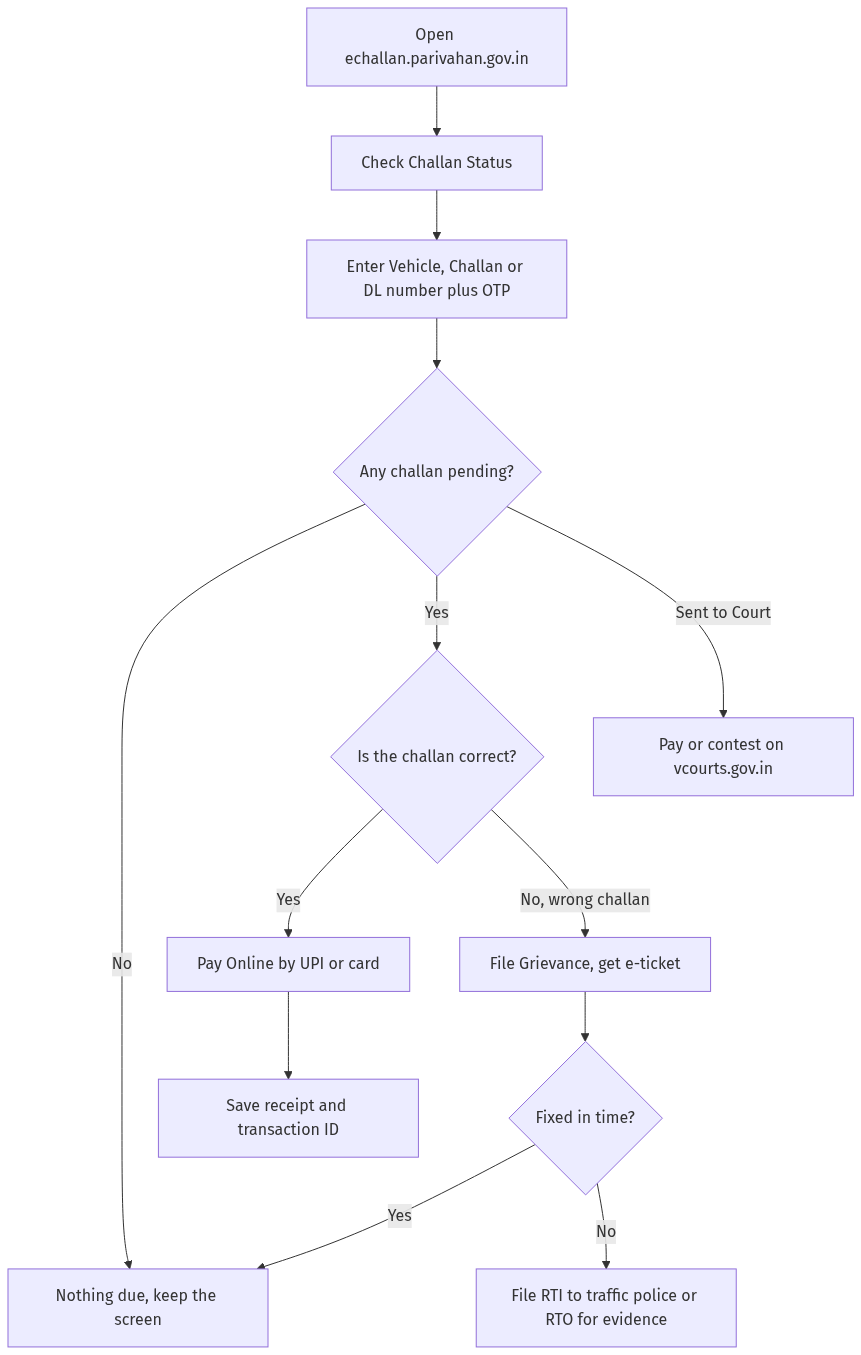
Figure: step-by-step flow. If a step stalls, use the grievance or RTI route shown.
Frequently asked questions
Can I check an eChallan without the challan number?
Yes. On echallan.parivahan.gov.in you can search by Vehicle Number or DL Number instead of the challan number. Add the captcha and the OTP sent to your registered mobile, and every pending challan for that vehicle or licence appears.
Which is the official eChallan website?
The official site is echallan.parivahan.gov.in, run by the Ministry of Road Transport and Highways. The portal itself warns against fraudulent look-alike websites and apps, so check the address bar and never pay through links sent by strangers.
How do I pay my eChallan?
Open the pending challan on the portal, tap Pay Online, and pay by UPI or by debit or credit card. Wait for the success screen and save the receipt and transaction ID as proof of payment.
My money was deducted but the challan still shows pending. What now?
Do not pay again. Use Check Pending Transaction on the portal to confirm the status, which often updates within a short while. If it does not, email [email protected] with a screenshot, or call 0120-4925505 between 6 AM and 10 PM.
How do I dispute a wrong traffic challan?
Use the Grievance or Complaint link on echallan.parivahan.gov.in. Enter your details, the challan and vehicle or DL number, the location and a short description, attach any photo, and submit. You get an e-ticket number to track the complaint.
What if my grievance is ignored?
File an RTI with the traffic police or RTO asking for the challan evidence, including the photograph, location stamp, issuing officer and the e-challan record. That record either clears you or gives you grounds to get the challan cancelled.
What does Sent to Court mean on my challan?
It means the challan has moved to a virtual court and can no longer be settled on the eChallan portal alone. Go to vcourts.gov.in to search your case, pay the fine, or contest it before the magistrate.
Is there a discount on old traffic challans?
States hold periodic Lok Adalat sittings that can settle pending challans, sometimes with a waiver. The terms and waiver amount vary by state and by each sitting, so check your state transport or police portal for the next date and the exact rules.