How to e-Sign a Document Legally 2026
Reviewed on 2026-06-20 by Dr. Shrawan Kumar Pathak.
Quick Reply: To e-Sign legally, open your PDF on DigiLocker, choose eSign, enter your Aadhaar number and the OTP sent to your Aadhaar-linked mobile, and give consent. This Aadhaar eSign is valid under Section 3A and Section 5 of the IT Act, 2000, and equals a handwritten signature for most documents.
Start here: which path is yours?
E-signing in India is not one button. It is a set of forks. Read each “if” below, jump to the “then”, and you will know exactly what to do. The rule that makes all of this binding is the Information Technology Act, 2000: Section 3A recognises an electronic signature, and Section 5 gives it the same legal effect as ink on paper.
If you just want to sign a PDF for free, then use DigiLocker eSign
This is the simplest legal route for an ordinary citizen, and it carries no fee that you have to enter.
- Log in at digilocker.gov.in or the DigiLocker app with your mobile number and security PIN.
- Open DigiLocker Drive and upload or pick the PDF you want to sign.
- Tap the three-dot menu next to the file and choose eSign.
- On the eSign service page, type your Aadhaar number.
- Enter the OTP sent to your Aadhaar-linked mobile and tick the consent box.
- Submit. Your file now carries a digital signature, and a signed copy is saved in your Drive.
The whole thing takes a few minutes, needs no token, no scanner and no branch visit.
If you do not have DigiLocker, then use any CCA-empanelled eSign provider
Aadhaar eSign is delivered through a chain set up by the Controller of Certifying Authorities (CCA). The CCA empanels eSign Service Providers, and the actual signing certificate is issued by a licensed Certifying Authority such as CDAC or Protean (NSDL e-Gov). You usually meet this service inside an app you already use: a bank loan portal, an insurance form, an NPS account opening, or a government scheme application. When such a portal says “Sign with Aadhaar OTP”, it is the same legally recognised eSign. If a portal asks for your Aadhaar OTP only to e-Sign, that is normal and lawful under the Second Schedule of the IT Act.
If you need a signature for high-value or repeated business use, then get a DSC
A one-time Aadhaar OTP eSign is perfect for occasional documents. If you file GST, sign as a company director, e-file on the MCA portal, or sign many tenders, you may instead need a Digital Signature Certificate (DSC) on a USB token. A DSC is a paid certificate from a licensed Certifying Authority and stays valid for a fixed period. Both eSign and a DSC rest on the same IT Act, so both are legally valid; the choice is about how often you sign and what the receiving portal demands. Verify the current DSC price and validity directly with a licensed CA listed on cca.gov.in.
What you can and cannot e-sign
If your document is an everyday agreement, then e-Sign is fine
Loan agreements, account opening forms, rent receipts, vendor contracts, consent forms, declarations and most service agreements can be e-signed and are enforceable. This is the strength of Section 5: where any law asks for a signature, a valid electronic signature satisfies it.
If your document is a will, then do not e-Sign it
The First Schedule of the IT Act lists documents that are kept out of electronic signing. A will or any testamentary disposition must still be signed on paper in the presence of witnesses. A trust deed is similarly excluded. Some powers of attorney, promissory notes and immovable property contracts were partly opened up by a later notification, but only in narrow cases involving regulated financial entities. Because property and succession papers differ by document and by state, confirm with a lawyer or your sub-registrar before you rely on an e-signature for a deed, a will or a power of attorney. When in doubt, sign on paper.
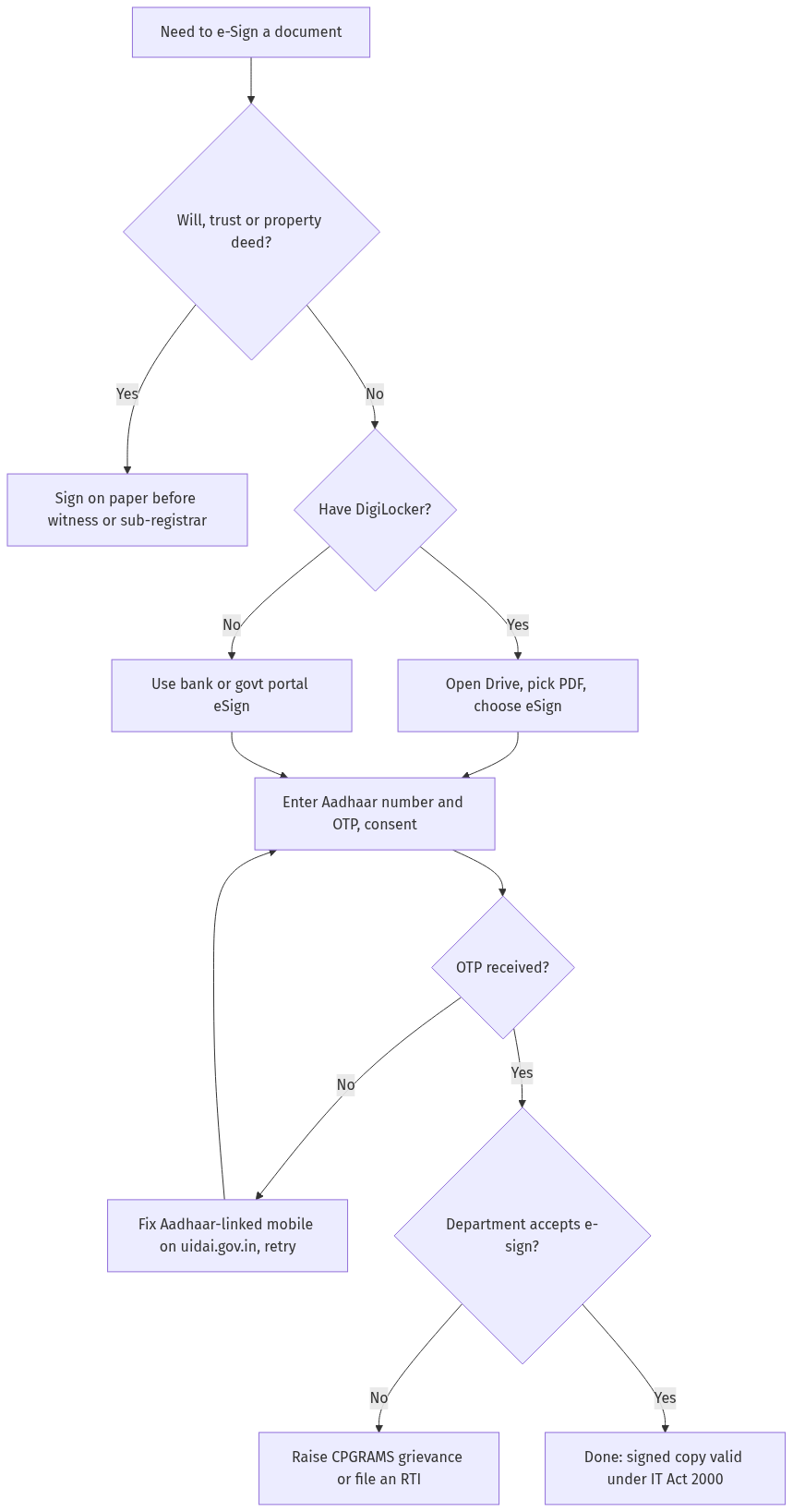
Figure: step-by-step flow. If a step stalls, use the grievance or RTI route shown.
If something goes wrong
If the OTP never arrives, then fix your Aadhaar-mobile link
The OTP goes only to the mobile number registered in your Aadhaar. If you changed your SIM or never linked a number, the eSign will fail. Update your mobile in Aadhaar at an enrolment centre or check the linked number on uidai.gov.in before trying again. You can also lock and unlock your Aadhaar to keep authentication tight; see our guide on Aadhaar biometrics below.
If a department refuses your e-signed document, then escalate or file an RTI
A genuine Aadhaar eSign is legally equal to a wet signature, so a government office should accept it. If an official still refuses, first raise a grievance on the relevant portal or on CPGRAMS at pgportal.gov.in. If the refusal continues, file an RTI with that public authority asking under what rule they reject a validly e-signed document and who approved that stand. The written reply usually settles the matter, because there is no such rule.
Frequently asked questions
Is an Aadhaar eSign legally valid in India?
Yes. Section 3A of the IT Act, 2000 recognises an electronic signature made with the Aadhaar e-KYC technique listed in the Second Schedule, and Section 5 gives it the same legal effect as a handwritten signature for documents that are not excluded.
Does e-Sign on DigiLocker cost anything?
The DigiLocker eSign flow for citizens does not ask you to pay a fee while signing. If a private platform bundles eSign into a paid service, that charge is the platform's, not a government fee. Check the cost on the portal you are using before you sign.
What is the difference between eSign and a DSC?
Aadhaar eSign is a one-time, OTP-based signature with no hardware, ideal for occasional documents. A Digital Signature Certificate sits on a USB token, is paid, lasts a fixed period and suits frequent business filing. Both are valid under the IT Act.
Can I e-Sign a will or a property sale deed?
No for a will, and usually no for a sale deed of immovable property. The First Schedule of the IT Act keeps wills and trusts out of electronic signing, and property registration is done before the sub-registrar. Confirm your document type with a lawyer first.
Why is my Aadhaar OTP for eSign not coming?
The OTP is sent only to the mobile number linked to your Aadhaar. If that number is old or unlinked, no OTP arrives. Update the mobile number in your Aadhaar record on uidai.gov.in or at an enrolment centre, then retry.
Who runs the eSign service in India?
The Controller of Certifying Authorities empanels eSign Service Providers, and licensed Certifying Authorities such as CDAC and Protean issue the signing certificate. You reach eSign through an application like DigiLocker, your bank, or a government portal.
Is a typed name or a scanned signature the same as eSign?
No. A typed name or a pasted image of your signature is not a recognised electronic signature on its own. Legal e-signing needs the Aadhaar e-KYC technique or a Digital Signature Certificate so the signature is verifiable and tamper-evident.
Sources
For storing and sharing the documents you sign, read our DigiLocker store and share guide. To share Aadhaar safely while you e-Sign, see how to use the Aadhaar Virtual ID, keep your biometrics protected with locking and unlocking Aadhaar, and if you need a physical card, learn to apply for an Aadhaar PVC card.