Renew Your NSP Scholarship 2026

Reviewed on 2026-09-01 by Dr. Shrawan Kumar Pathak.
Quick Reply: Renew your NSP scholarship on scholarships.gov.in: log in with your existing 14-digit OTR, choose Renewal, update your academic details, confirm your Aadhaar-seeded bank account, and submit before your scheme's closing date. Then your institute must verify it. Miss the window and you lose the year.
The clock is the enemy here, not the form. A renewal takes ten honest minutes, but the scholarship slips away in the days you let it sit. The portal opened for the 2026-27 academic year on 1 June 2026, and every scheme runs its own closing date after that. So treat this as a countdown, not a chore.
First, mark your deadline today
NSP does not set one single last date for the whole country. Each scheme, your pre-matric, post-matric, merit-cum-means or central-sector award, announces its own renewal closing date on the portal. That is the only date that matters to you.
So before you read another word, do this: open scholarships.gov.in, find your scheme, and write its closing date on your phone calendar with a reminder three days earlier. If a date is not yet shown for your scheme, check back weekly. Never trust a date from a coaching blog or a forwarded message. Verify the exact closing date for your scheme on scholarships.gov.in.
Why the urgency? A renewal that is not submitted and verified in time cannot be revived later. You either reapply as a fresh candidate next year, if the scheme even allows it, or you simply lose this year's money.
What renewal actually means
Renewal is only for students who already received this scholarship last year and are continuing the same course. You do not build a new profile. You do not create a second login. You carry forward the One Time Registration you already have.
Your OTR is a unique 14-digit number tied to your Aadhaar, and it stays with you for your whole academic career. That is the thread the system follows from one year to the next.
One trap to avoid: do not file a fresh application by mistake. A duplicate fresh-plus-renewal pair gets rejected, and untangling that wastes the very days you cannot spare.
Be ready before you log in
Have these in hand so you do not stall halfway:
- Your OTR number or registered application ID and password.
- Your last passed examination marksheet, showing you were promoted.
- Your current bank passbook, with an Aadhaar-seeded account active for DBT.
- Your current course, year and institute details.
If your last marksheet has an error, fix it before you renew, do not submit on a wrong record. Our guide on what to do when a marksheet correction is rejected walks through that. Lost the marksheet itself? See how to get a duplicate marksheet using RTI quickly.
The renewal steps, in order
Step 1: Log in with your OTR
Go to scholarships.gov.in, click Login, and enter your OTR or application ID and password. Choose the Renewal option, not fresh application. If you have forgotten your password, reset it the same day, password recovery is not something to leave for the deadline evening.
Step 2: Update your academic details
Enter your new class or year, your latest marks and your current institute. This is where the scheme checks that you were promoted and still meet its progression rule (minimum marks or attendance, as your scheme defines). Be exact, mismatched numbers invite a defective-application flag.
Step 3: Confirm your bank and Aadhaar seeding
Your money arrives only through Direct Benefit Transfer into an Aadhaar-seeded bank account. Use the portal's Check Aadhaar Seeding Status tool. If it is not seeded, walk into your bank branch and seed it now, a payout cannot land in an unseeded account no matter how perfect your application is.
Step 4: Submit and save the proof
Submit before your scheme's closing date and download the acknowledgement. Screenshot the submitted status too. That timestamp is your evidence if anything goes wrong downstream.
After you submit: the verification chain
Submitting is not the finish line. Your renewal now travels through a chain, and the first link is the one that most often jams.
- Institute verification (Level 1). Your school or college nodal officer must verify your renewal on NSP. This is the usual choke point, especially close to the cut-off.
- Nodal officer verification. It then moves to the District, State or Ministry nodal officer (DNO, SNO, MNO) depending on the scheme.
- Payment. Once cleared, the amount is released through PFMS into your Aadhaar-seeded account. Use Track Your Payment on the portal to follow it.
So after submitting, do not relax. Confirm within a few days that your institute has actually verified you. A renewal sitting unverified at the institute on the closing date is as good as not submitted.
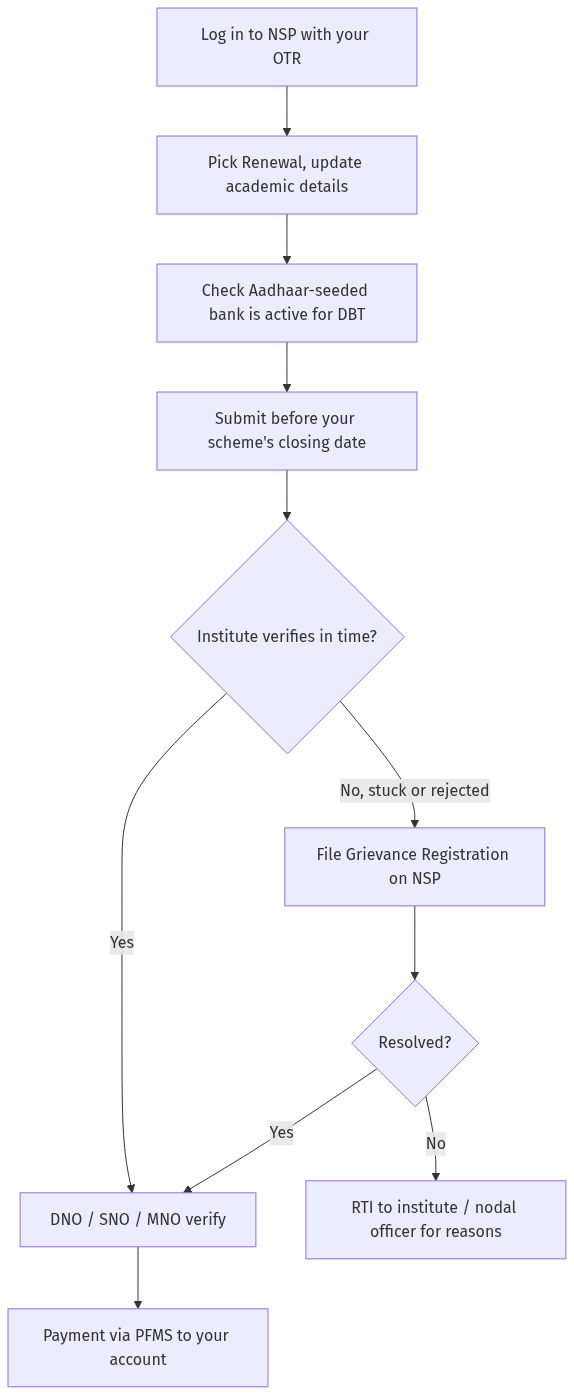
Figure: step-by-step flow. If a step stalls, use the grievance or RTI route shown.
If your renewal is stuck or rejected
When the institute sits on your application or it is rejected without a clear reason, move fast, the deadline does not pause for your problem.
- Chase the institute first. Ask your scholarship nodal officer to verify it and keep a dated written request (email or letter).
- Raise a grievance on NSP. Use Grievance Registration on scholarships.gov.in and keep the ticket number.
- Call the NSP Helpdesk. Phone 0120-6619540 (8:00 AM to 8:00 PM, all days except government holidays) or email helpdesk[at]nsp[dot]gov[dot]in. Payment-only queries go to the PFMS helpdesk.
- File an RTI. If the institute or nodal office still gives no answer, file an RTI asking why your verified renewal is pending or rejected and on what date it was acted on. A public college or government school is a public authority, and an RTI usually breaks a silent file open.
The RTI route is powerful because it forces a dated, written reason. If you have hit walls before with an institution that ignored requests, the same discipline that works for degree verification through RTI works here.
A quick word on money in the gap
If a delayed renewal leaves a funding gap, do not stop attending. Know your repayment and pause rights on any study loan so a short delay does not snowball, our explainer on education loan moratorium rights covers the breathing room you are entitled to.
Frequently asked questions
Do I need a new OTR every year to renew?
No. Your 14-digit OTR is issued once on your Aadhaar and lasts your whole academic career. For renewal you log in with the same OTR and only update your academic details. Creating a second profile causes rejection.
What is the last date to renew my NSP scholarship in 2026?
There is no single all-India date. The portal opened for 2026-27 on 1 June 2026, and each scheme announces its own closing date. Check the exact closing date for your scheme on scholarships.gov.in and set a reminder.
Can I renew if I failed or was not promoted?
Generally no. Renewal requires you to have been promoted to the next class or year and to meet your scheme's progression rule, such as minimum marks or attendance. Confirm your scheme's exact rule on the portal before you apply.
Why has my renewal not been paid even after I submitted?
Submission is only the start. Your institute must verify it, then the nodal officer, then PFMS releases the payment. Check that your institute has verified you and that your bank account is Aadhaar-seeded for DBT.
My college has not verified my renewal. What do I do?
Send your nodal officer a dated written request, then raise a grievance on NSP and note the ticket number. If it stays stuck, call the NSP Helpdesk, and if there is still no answer, file an RTI asking why your renewal is pending.
My bank account is not Aadhaar-seeded. Will I still get paid?
No. NSP pays only into an Aadhaar-seeded account through DBT. Use Check Aadhaar Seeding Status on the portal, and if it is not seeded, visit your bank branch to seed it before the closing date.
Can I switch my bank account during renewal?
You can update bank details, but the new account must be Aadhaar-seeded and active for DBT. Verify the current process for changing payout details on scholarships.gov.in, and confirm seeding before you submit so the payment does not bounce.
Sources
NSP scholarship renewal: Common issues and fixes (2026)
- Step 1: What is NSP scholarship renewal and why does it fail? (a) NSP renewal: (i) National Scholarship Portal — renewal for continuing students, (ii) must renew every year — until course completion, (iii) renewal window: portal opened 1 June 2026 for AY 2026-27; each scheme sets its own closing date, (b) common failures: (i) incomplete application — missing documents, (ii) income certificate expired, (iii) bank details not verified, (iv) marks/attendance not updated, (v) institute not verified, © rights: (i) student has right to renewal — if eligible, (ii) NSP must process within timeline, (iii) complain to NSP + Ministry of Education, (d) authority: NSP + Ministry of Education + State Scholarship Dept, (e) law: NSP guidelines + Education Ministry circulars.
- Step 2: Comparison table — NSP renewal scenarios. (a) Income certificate expired: (i) issue: income certificate older than 1 year, (ii) remedy: obtain new certificate + upload, (iii) timeline: 7-15 days, (iv) escalation: NSP helpdesk, (v) example: certificate expired; renewed; uploaded; approved, (b) Bank not verified: (i) issue: bank details not verified by PFMS, (ii) remedy: contact bank + NSP helpdesk, (iii) timeline: 15-30 days, (iv) escalation: PFMS, (v) example: bank not verified; contacted bank; verified; scholarship credited, © Institute not verified: (i) issue: institute hasn't verified application, (ii) remedy: contact institute + NSP, (iii) timeline: 7-15 days, (iv) escalation: NSP + Ministry, (v) example: institute delayed; contacted; verified; approved, (d) Marks not updated: (i) issue: previous year marks not entered, (ii) remedy: update marks + upload marksheet, (iii) timeline: 7-15 days, (iv) escalation: NSP helpdesk, (v) example: marks missing; uploaded; approved, (e) Application incomplete: (i) issue: missing documents, (ii) remedy: upload all required docs, (iii) timeline: 7-15 days, (iv) escalation: NSP helpdesk, (v) example: documents missing; uploaded; approved. (Note: NSP renewal must be done every year — check income certificate, bank, institute verification.)
- Step 3: How to fix NSP renewal issues. (a) Step 1: Check application status on scholarships.gov.in, (b) Step 2: Identify deficiency — NSP dashboard shows reason, © Step 3: Upload missing documents, (d) Step 4: Contact institute for verification, (e) Step 5: Contact NSP helpdesk — 0120-6619540, (f) Step 6: File RTI with your institute or the scheme's nodal ministry (Ministry of Education for central/UGC schemes) for renewal status.
- Step 4: Practical tips. (a) renew before your scheme's own closing date, (b) keep income certificate valid, © bank must be PFMS-verified, (d) RTI with the institute or the scheme's nodal ministry — effective, (e) Example: an illustrative account (not a named person) — a renewal stuck at institute verification moved within days once an RTI asked for the pendency status and action date.
- Step 5: Key provisions. (a) NSP guidelines: renewal, (b) PFMS: bank verification, © Institute: verification, (d) Ministry of Education: grievance, (e) RTI: file with Ministry.
See Scholarship Stuck and How to File RTI.