Table of Contents
Transfer PF on Job Change 2026
Reviewed on 2026-06-20 by Dr. Shrawan Kumar Pathak.
Quick Reply: When you change jobs, transfer your old PF into your new account online through the EPFO Unified Member Portal. Log in with your UAN, open Online Services and file the revamped Form 13 transfer request. Since January 2025, EPFO removed employer approval in most cases, so the source office approval auto credits your money.
Should you transfer or withdraw? Start here
Every time you switch jobs your old employer stops paying into one Provident Fund account and your new employer opens another. You do not lose the old money, but it sits idle and stops earning the way it should. You have two honest choices: transfer the old balance into your new account, or withdraw it. For almost everyone still working, transfer is the right call. Your service stays continuous, your pension years keep counting, and you avoid tax on early withdrawal.
This guide walks the transfer path step by step. If your employer is blocking the paperwork, that is a different problem, and we point you to the right page for it below.
When transfer is clearly better
Choose transfer if you are continuing in employment, want your Employees' Pension Scheme service to stay unbroken, or have less than five years of combined service (early withdrawal then becomes taxable). Keeping one running account also makes future loans, balance checks and final settlement far simpler.
When people wrongly withdraw
Many people withdraw small balances at every job change out of habit. That resets your pension clock and can trigger tax deducted at source. Unless you genuinely need the cash and are leaving the workforce, move the money, do not cash it out.
Check these prerequisites before you file
The transfer fails most often not because of EPFO, but because your own record is incomplete. Fix these first.
- Your UAN (Universal Account Number) is activated and the same UAN runs across both jobs. If you were given a new UAN at the new job, you may need to merge them.
- Your Aadhaar is seeded and verified against your UAN, along with your PAN and bank account.
- Your mobile number is active for the OTP.
- Your previous employer has marked your date of exit in your service history. Without an exit date the transfer cannot move.
If your KYC is incomplete or your name or date of birth does not match, sort that out first. A mismatch is the single biggest reason a transfer stalls.
Step by step: transfer PF online with Form 13
Step 1: Log in to the member portal
Go to the EPFO Unified Member Portal and sign in with your UAN and password. Make sure the mobile number on file can receive the one time password.
Step 2: Open the transfer request
Under Online Services, select One Member - One EPF Account (Transfer Request). This is the online version of Form 13. Your personal and KYC details load automatically from your UAN record.
Step 3: Enter old and new account details
Add details of your previous and current employment, including the old PF account or member ID. Verify each field against your service history so the source and destination match correctly.
Step 4: Choose who attests and submit
Pick whether the previous or the present employer will attest the request, based on whose digital signature is available. Submit, then authorise with the OTP sent to your registered mobile. Since the revamped Form 13 took effect in January 2025, EPFO has removed employer approval in the majority of cases, so many requests no longer wait on an employer at all.
Step 5: Let the source office approve
EPFO no longer requires approval at the destination office. Once the Source (Transferor) Office approves your claim, the previous account is automatically transferred and credited to your present account. The revamped form also splits your balance into taxable and non taxable parts so any tax deducted at source on interest is calculated correctly.
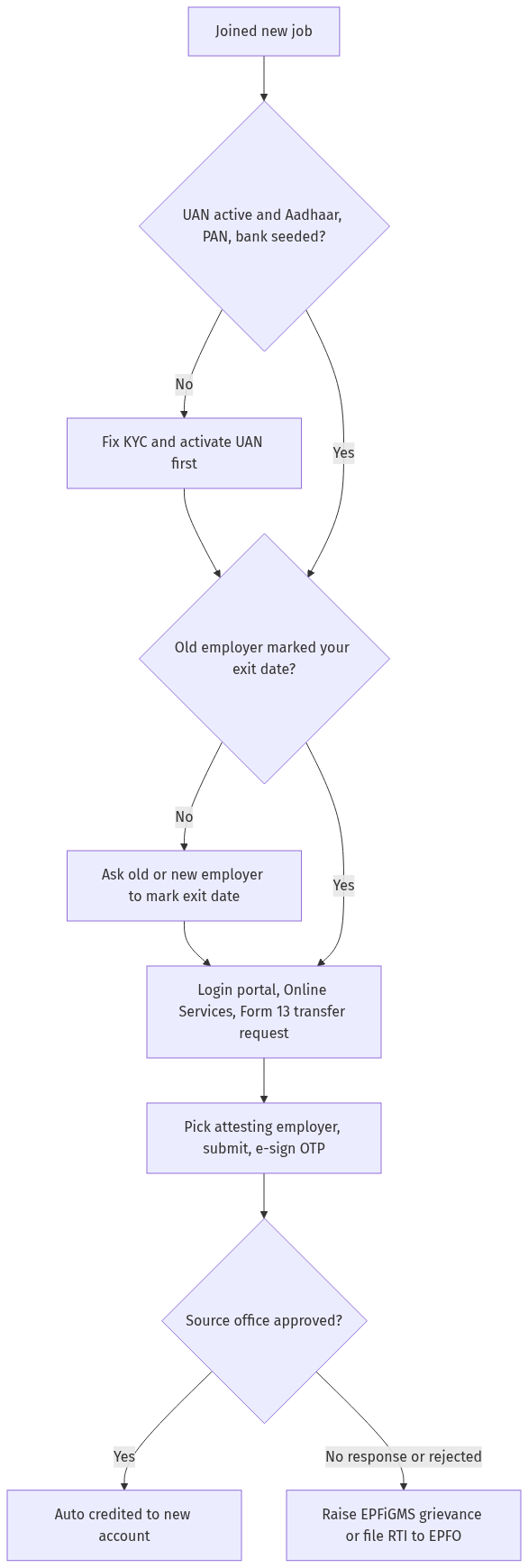
Figure: step-by-step flow. If a step stalls, use the grievance or RTI route shown.
Track your transfer and what to do if it stalls
After you submit, watch the status. On the member portal open Online Services and select Track Claim Status to see where your Form 13 stands. EPFO usually processes transfers within a few weeks, but a KYC error, an Aadhaar mismatch or a missing exit date can stretch it out, so check the portal rather than assuming silence means a problem.
If your request is rejected, sits unactioned, or you cannot move it because your previous employer will not cooperate, you have a clear escalation path. Raise a grievance on the EPFiGMS portal, and if EPFO still does not respond, file an RTI to the concerned regional EPF office asking for the status and reason. For the specific situation where an employer refuses to sign or release transfer documents, read our companion guide on what to do when your employer will not sign PF transfer papers.
You can confirm the money has landed by following our walkthrough on how to check your EPF claim status online in 2026. If you discovered during this process that you are sitting on two UANs, fix that with our guide to merging multiple UANs into one before you transfer, and if your claim shows as rejected or pending, see how to resolve a rejected or pending EPFO claim.
Frequently asked questions
Do I still need my old employer to approve the transfer?
In most cases, no. Since the revamped Form 13 began in January 2025, EPFO removed the requirement of employer approval in the majority of transfer cases. Once the source office approves, your old balance is credited to your new account automatically. Some cases may still route through an employer for attestation.
What is Form 13 and where do I find it?
Form 13 is the EPF transfer request. You do not download a paper form for the normal online route. You file it on the EPFO Unified Member Portal under Online Services as One Member - One EPF Account (Transfer Request).
How long does a PF transfer take?
EPFO typically completes transfers within a few weeks once the source office approves. The exact time depends on your KYC being clean and your exit date being marked. Track the live status on the member portal rather than relying on a fixed number of days.
Will transferring my PF cost me any tax?
A genuine transfer between your own EPF accounts is not a withdrawal, so it is not taxed. The revamped form separates taxable and non taxable components only so that any tax deducted at source on interest, where applicable, is computed accurately. Tax usually arises on early withdrawal, not on transfer.
My UAN and KYC are not linked. Can I still transfer?
Not reliably. Activate your UAN, seed and verify your Aadhaar, PAN and bank account, and confirm your previous employer has entered your exit date. Fixing these prerequisites first is the most effective way to avoid a rejected or stuck transfer.
Should I withdraw instead of transferring when I change jobs?
If you are continuing to work, transfer is almost always better. It keeps your service continuous, protects your pension years, and avoids tax on early withdrawal. Withdraw only if you genuinely need the cash and are leaving employment.
What if my transfer is rejected or there is no response?
Raise a grievance on the EPFiGMS portal with your UAN and the claim details. If EPFO still does not act, file an RTI to the regional EPF office asking for the status and the reason for delay. If the blocker is an uncooperative employer, follow our dedicated guide on that situation.