Table of Contents
mAadhaar App Setup 2026

Reviewed on 2026-06-20 by Dr. Shrawan Kumar Pathak.
Quick Reply: Install the mAadhaar app by UIDAI from the Play Store or App Store, set a 4-digit app PIN, then tap Register Aadhaar, type your Aadhaar number and the captcha, and submit the OTP sent to your registered mobile. Your profile then carries your Aadhaar, QR and VID on your phone.
This guide walks you through the screens in the order they actually appear. Keep your phone in front of you. Each step below names the button or field you will see on screen, so you can match it tap by tap. The whole setup takes about five minutes if your mobile number is already linked to your Aadhaar.
Before you start: one thing to check
mAadhaar will only register your profile if the OTP can reach the mobile number linked to your Aadhaar. So the single most important question is: does your current SIM still match the number in your Aadhaar record? If you have changed numbers and not updated it, the OTP screen will simply never let you through. Fix that first at an Aadhaar centre, then come back to this app.
You will also set a 4-digit PIN that locks the app. Pick something you can remember but a stranger cannot guess. This is different from your e-Aadhaar PDF password, which is the first four letters of your name in capitals plus your birth year, for example SURE1990.
Step 1: Install the official app
The screen you should see
Open the Play Store on Android or the App Store on iPhone and search for mAadhaar. The genuine listing shows the developer as the Unique Identification Authority of India (UIDAI). Look for that publisher name before you tap Install. Several copycat apps use a similar icon, so the publisher line is your proof you have the right one. The app is free; you never pay to install it or to download your Aadhaar.
When it opens the first time, choose your language. The app speaks English and about a dozen Indian languages, so pick the one you read most comfortably. You can change it later from the settings gear.
Step 2: Set your 4-digit app PIN
On first launch the app asks you to create a 4-digit PIN (some screens call it a password). Type it once, then type it again to confirm. This PIN unlocks the app every time you open it, so your Aadhaar stays private even if someone picks up your phone. Note it down somewhere safe that is not your phone.
Step 3: Register your Aadhaar profile
The screen you should see
From the main dashboard, tap Register Aadhaar at the top. Now you fill in three things on this screen:
- Your 12-digit Aadhaar number (or scan your card QR if the option shows).
- The captcha characters exactly as displayed.
- Then tap Request OTP.
An OTP travels to the mobile number registered with your Aadhaar. Enter it in the next box and tap Submit. If the code is correct, the app builds your profile and shows your name, photo and demographic details. That profile is now your digital Aadhaar and is accepted as valid ID proof. You can read more on what the card carries in our Aadhaar PVC card guide.
If the OTP never arrives
Wait a full minute and tap resend once. If it still does not come, your number is either out of network range or no longer linked to your Aadhaar. A weak signal is fixable by moving to better coverage. An unlinked number is not: you must update your mobile number at an Aadhaar enrolment centre and then register again.
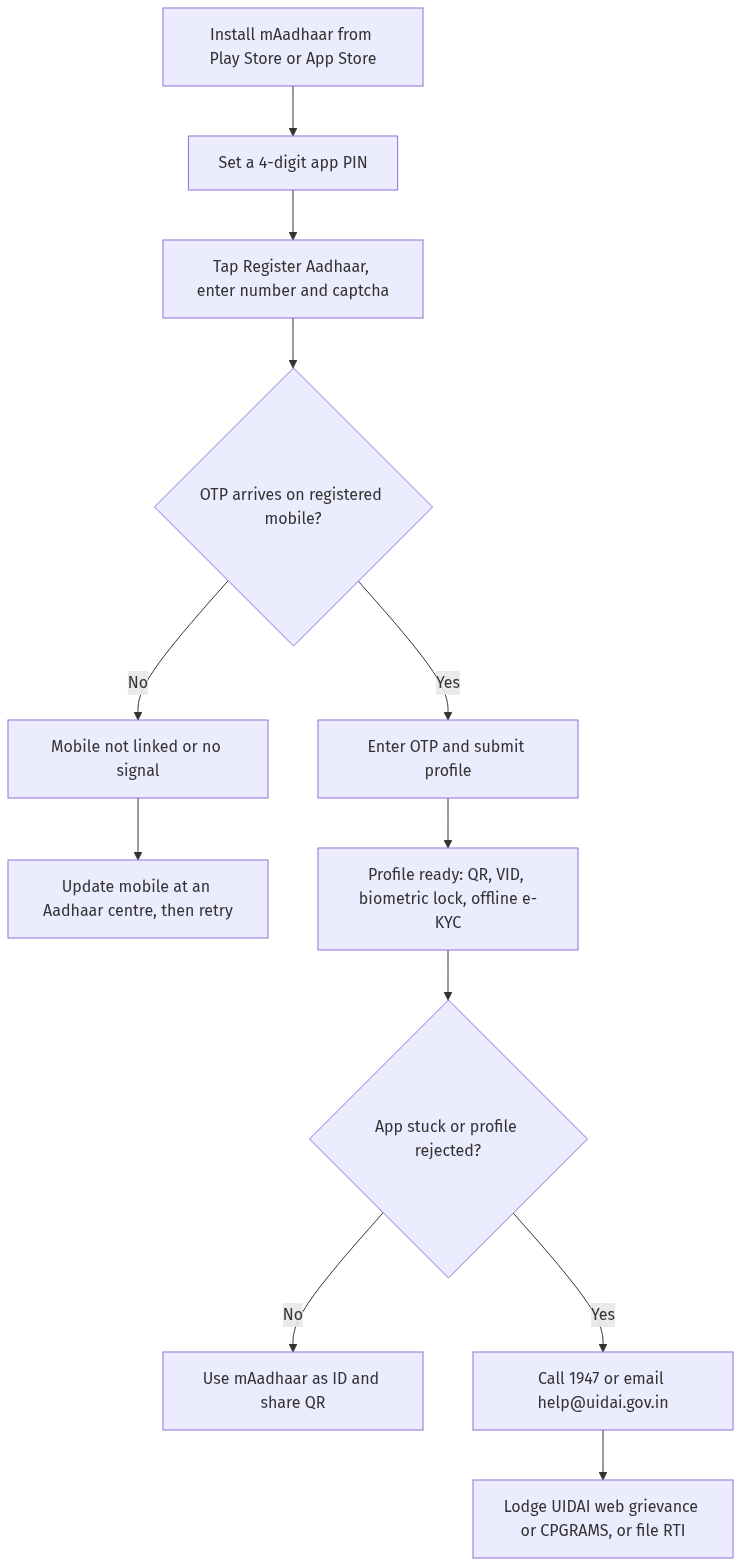
Figure: step-by-step flow. If a step stalls, use the grievance or RTI route shown.
Step 4: Add the rest of your family (optional)
You do not need a separate phone for each person. From the dashboard you can add more than one profile on the same device, so a parent can hold the profiles of children or elders. Each profile still needs its own registered mobile number to receive its own OTP. The app may cap how many profiles sit on one phone, so verify the current limit on uidai.gov.in if you are adding several.
Step 5: Use what the app gives you
Share your QR and offline e-KYC
Once registered, your profile shows a secure QR code. A shop, hotel or office can scan it to verify your identity without you handing over a photocopy. The app can also generate Aadhaar Paperless Offline e-KYC, a digitally signed XML that a service provider can read and confirm as genuine because it carries the UIDAI digital signature. This keeps your full Aadhaar number out of strangers' files.
Generate a Virtual ID (VID)
Instead of sharing your real Aadhaar number, you can create a temporary 16-digit Virtual ID from the app and quote that for verification. Our Aadhaar Virtual ID guide explains when a VID is safer than the number itself.
Lock your biometrics
The app lets you lock and unlock your fingerprints and iris. With biometrics locked, nobody can run a biometric authentication against your Aadhaar until you unlock it for a short window. This is the simplest defence against silent misuse, and our biometric lock and unlock guide shows the toggle step by step.
Sign in to UIDAI services with TOTP
The app also shows a rotating TOTP, a time-based one-time password. When the UIDAI website asks for an OTP and your SMS is not arriving, read the TOTP from the app instead. It refreshes every few seconds, so use it quickly.
When the app is stuck or your profile is rejected
If registration fails again and again, the OTP loops forever, or the app crashes on a particular screen, do not keep retrying blindly. Note the exact error and reach UIDAI: call the toll free helpline 1947, which runs round the clock for self-service and has agents available daily during published hours, or email [email protected]. Keep your EID, URN or SRN handy so they can trace your record fast.
If the helpline does not resolve it, lodge a written grievance on the UIDAI web portal or through CPGRAMS, both available all day. And if a public authority is sitting on your Aadhaar update or refuses to act, you can file an RTI to ask the status of your request in writing. To check whether your details actually went through, our Aadhaar authentication history guide shows how to read every recent use of your number.
Frequently asked questions
Is the mAadhaar app free?
Yes. Installing the app and using it to download your Aadhaar, generate a VID or share your QR costs nothing. UIDAI never charges for these online services, so any app or person demanding a fee for them is not official.
Do I need my Aadhaar-linked mobile number to register?
Yes, and there is no way around it. The profile is created only after you enter the OTP sent to the mobile number in your Aadhaar record. If that number has changed, update it at an Aadhaar centre first, then register in the app.
What is the difference between the app PIN and the e-Aadhaar password?
The 4-digit app PIN is one you choose to unlock mAadhaar. The e-Aadhaar PDF password is fixed by UIDAI: the first four letters of your name in capitals followed by your year of birth, such as SURE1990.
Can I keep more than one family member's Aadhaar on one phone?
Yes. You can add more than one profile on the same device, which helps a parent hold children's or elders' Aadhaar. Each profile needs its own registered mobile number for its OTP. Check the current profile limit on uidai.gov.in if you plan to add several.
Is mAadhaar accepted as valid ID proof?
A registered mAadhaar profile is accepted as a valid identity proof, the same as a printed Aadhaar. You can show the profile or let the verifier scan your secure QR code.
What is TOTP and when should I use it?
TOTP is a time-based one-time password the app generates on its own. Use it on the UIDAI website in place of an SMS OTP when your SMS is delayed or not arriving. It changes every few seconds, so enter it quickly.
The app keeps rejecting my OTP. What now?
First confirm the SIM in your phone is the number linked to your Aadhaar and that you have signal. If it still fails, call 1947 or email [email protected] with your EID handy, then escalate to the UIDAI web grievance portal or CPGRAMS if needed.
Sources
The UMANG app guide covers another government app you can pair with mAadhaar for EPFO and other services.
mAadhaar app setup: Biometric unlock, OTP, TOTP, mask Aadhaar (2026)
How to use mAadhaar app: Complete guide for 2026
- What is mAadhaar and how to install it? (a) mAadhaar: (i) Official mobile app by UIDAI — carries Aadhaar on phone, (ii) Available on Android and iOS, (iii) Download from Google Play Store or Apple App Store, (iv) Free — no fee for download or use, (v) Works offline — Aadhaar data stored locally on device, (b) Installation: (i) Open Play Store/App Store, (ii) Search “mAadhaar” — publisher: Unique Identification Authority of India, (iii) Install — verify publisher is UIDAI, (iv) Open app — set 4-digit PIN, (v) Add Aadhaar — enter 12-digit Aadhaar number + OTP, © Key features: (i) Aadhaar profile — name, DOB, gender, address, photo, (ii) TOTP — time-based OTP for authentication, (iii) Lock/unlock biometrics — iris, fingerprints, (iv) Mask Aadhaar — hide first 8 digits, show last 4, (v) Share Aadhaar — QR code, PDF, (vi) Update address — via document or address validation letter, (vii) Check authentication history — last 50 transactions, (d) Authority: UIDAI — uidai.gov.in, (e) Law: Aadhaar Act 2016.
- How to lock/unlock biometrics on mAadhaar? (a) Lock biometrics: (i) Open mAadhaar app, (ii) Tap Aadhaar profile, (iii) Select “Lock Biometrics”, (iv) Enter 4-digit app PIN + OTP, (v) Biometrics locked — cannot be used for authentication, (b) Unlock: (i) Open app, (ii) Tap “Unlock Biometrics”, (iii) Enter PIN + OTP, (iv) Biometrics unlocked temporarily — 10 minutes, (v) Auto-locks after 10 minutes for security, © Why lock: (i) Prevent unauthorised biometric authentication, (ii) Protect against identity theft, (iii) UIDAI recommends locking when not in use, (d) Scenario: A locked biometrics — tried to authenticate at bank; bank said biometrics locked; unlocked via mAadhaar for 10 min; completed transaction.
- How to use TOTP on mAadhaar? (a) TOTP: (i) Time-based One-Time Password — 6-digit code, (ii) Refreshes every 30 seconds, (iii) No need for SMS/OTP — works offline, (iv) Available in mAadhaar app under Aadhaar profile, (b) Usage: (i) Open mAadhaar, (ii) Tap Aadhaar profile, (iii) TOTP displayed — 6-digit code + timer, (iv) Use TOTP instead of OTP — at UIDAI portal, banks, telecom, (v) Valid for 30 seconds — refreshes automatically, © Advantages: (i) No SMS dependency — works without network, (ii) Faster than OTP, (iii) More secure — time-synchronised, (iv) Accepted at UIDAI portals, (d) Where accepted: (i) UIDAI — update, lock/unlock, (ii) Some banks — KYC, (iii) Telecom — re-verification, (e) Note: TOTP is linked to your Aadhaar profile in the app — cannot be shared.
- How to mask Aadhaar in mAadhaar? (a) Mask Aadhaar: (i) Hides first 8 digits of Aadhaar number, (ii) Shows only last 4 digits, (iii) QR code remains functional — for verification, (iv) UIDAI recommends masked Aadhaar for sharing, (b) How to mask: (i) Open mAadhaar, (ii) Tap Aadhaar profile, (iii) Tap “Mask Aadhaar”, (iv) Enter PIN + OTP, (v) Aadhaar masked — first 8 digits replaced with XXXX XXXX, © When to use masked: (i) Sharing Aadhaar copy — bank, employer, telecom, (ii) Downloading e-Aadhaar — select masked option, (iii) RTI applications — where Aadhaar is proof, (d) Legal validity: (i) Masked Aadhaar is equally valid — for all purposes, (ii) QR code contains full data — verifiable, (e) Scenario: Employer asked for Aadhaar; shared masked Aadhaar; HR verified via QR code; no issue.
- How to check authentication history on mAadhaar? (a) Auth history: (i) Shows last 50 authentication transactions, (ii) Includes date, time, type (biometric/OTP/demo), (iii) Shows entity name that performed authentication, (b) How to check: (i) Open mAadhaar, (ii) Tap “Authentication History”, (iii) Enter Aadhaar number + OTP/TOTP, (iv) Select number of records — up to 50, (v) Enter CAPTCHA, (vi) View history — date, time, auth type, entity, © Why check: (i) Detect unauthorised authentication, (ii) Verify only intended transactions, (iii) Report misuse — if unknown authentication found, (d) Scenario: Checked auth history; found unknown biometric auth at a telecom; filed complaint with UIDAI; investigated — SIM issued fraudulently; cancelled.
- How to update address via mAadhaar? (a) Address update via app: (i) Open mAadhaar, (ii) Tap “Update Address”, (iii) Two options: (A) via document — upload POA proof, (B) via Address Validation Letter — verifier confirms, (b) Via document: (i) Enter new address, (ii) Upload POA document — utility bill, bank statement, rent agreement, (iii) Submit + OTP, (iv) Update request registered — SRN generated, (v) Track status via SRN, © Via validation letter: (i) Enter verifier's Aadhaar — family member/landlord, (ii) Verifier receives SMS — consent request, (iii) Verifier approves via UIDAI portal, (iv) Address Validation Letter sent — with secret code, (v) Enter secret code in app — address updated, (d) Fee: Free — no charge for address update, (e) Timeline: 7-30 days — verification + update.
- What to do if mAadhaar app is not working? (a) Common issues: (i) App crashes — clear cache + restart, (ii) OTP not received — check network, use TOTP, (iii) Aadhaar not loading — check Aadhaar linked to mobile, (iv) Biometric lock failed — try via UIDAI portal, (v) Profile not showing — re-add Aadhaar, (b) Troubleshooting: (i) Update app — latest version from Play Store, (ii) Clear cache — Settings > Apps > mAadhaar > Clear Cache, (iii) Reinstall — uninstall + install fresh, (iv) Check internet — stable connection needed, (v) Contact UIDAI — 1947 toll-free, [email protected], © Alternatives: (i) UIDAI portal — uidai.gov.in — all services available, (ii) Aadhaar Seva Kendra — for biometric updates, (iii) E-Aadhaar — download from UIDAI portal, (d) Scenario: OTP not coming on mAadhaar; used TOTP instead; completed authentication; resolved.
- Key takeaways. (a) mAadhaar is free — official UIDAI app, (b) Lock biometrics — when not in use, © TOTP — offline OTP alternative, (d) Mask Aadhaar — before sharing, (e) Check auth history — detect misuse, (f) Update address — via app + document or validation letter, (g) Contact 1947 — for help.
See mAadhaar App and How to File RTI and Aadhaar Act.