Table of Contents
Update Bank KYC Without a Branch Visit 2026
RBI Ombudsman as of 1 July 2026: Bank, certain NBFC, prepaid-instrument and credit-information complaints go under the Reserve Bank - Integrated Ombudsman Scheme, 2026, which replaced RB-IOS 2021 from 1 July 2026. First complain to the entity. If there is no reply in 30 days (or the longer NPCI/card-network window, if it applies) or you reject the reply, file free at cms.rbi.org.in within 90 days. The Ombudsman can award up to Rs 30 lakh for consequential loss and up to Rs 3 lakh for time, expenses and harassment. Complaints received before 1 July 2026 stay under the 2021 scheme. Source: RBI FAQ, updated 1 July 2026 and the RB-IOS 2026 FAQ PDF dated 1 July 2026.
Reviewed on 2026-06-20 by Dr. Shrawan Kumar Pathak.
Quick Reply: If none of your KYC details changed, you do not need to visit the branch. Send a self-declaration through your bank's net banking, mobile app, registered email or registered mobile. RBI allows this. Low-risk customers have until 30 June 2026 to update. Only a real change needs fresh documents or a video call.
You opened the banking app to pay a bill and a red banner blocked the screen: “Your KYC is due for updation. Please visit your branch.” Do not queue at the counter yet. Since the Reserve Bank of India's revised rules of June 2025, most people finish re-KYC from the phone in their hand. This guide walks you through exactly what each screen looks like, in order.
First, work out which path you are on
Re-KYC is not one process. The bank is asking the same question every time: has anything in your records changed? Your answer decides the path.
- Nothing changed (same name, address, ID, photo, contact). You only send a self-declaration. No documents.
- Only the address changed. You submit the new address online; the bank verifies it later.
- Name, photo, identity proof or mobile changed. You need fresh documents through video KYC or upload.
Open your statement or passbook and check the spelling of your name and your registered address before you start. If they match your current life, you are on the easiest path.
Path A: nothing changed, send a self-declaration
This is the path most readers will use. RBI has confirmed that if there is no change in your KYC information, a simple self-declaration is enough to complete re-KYC, and you may send it through registered email, registered mobile number, ATMs, internet banking, the mobile app or even a letter, with no need to visit the branch.
Step 1: open the KYC tile
Log in to your bank's mobile app or internet banking. On the home screen, look for a tile or menu named Service Requests, KYC, or Re-KYC. On most apps it sits under “Services” or behind the three-line menu at the top left. Tap it.
Step 2: pick "No change in KYC details"
The next screen shows your masked details: name, date of birth, address and ID number with a few digits hidden. Read every line. If all of it is correct, choose the option worded like “I confirm there is no change in my KYC information” and tick the declaration box. This is the self-declaration RBI accepts.
Step 3: authenticate and submit
The app sends an OTP to your registered mobile. Enter it. You will see a confirmation screen with a service request number (often starting SR or REF). Screenshot it. That reference is your proof that you submitted on time, which matters if the banner does not clear immediately.
If you do not use net banking, the same declaration can go by registered email from your registered address, or by a signed letter to the branch. Quote your account number and write “no change in KYC details” clearly.
Path B: only your address changed
Moved house but everything else is the same? You do not need a branch visit either. In the same KYC section, choose “Change in address only”, type the new address and submit. RBI's rule is that the bank then verifies your declared address within two months, so do not panic if it shows “under verification” for a few weeks. Keep a copy of the new electricity bill or rent agreement in case the bank asks during that window.
Path C: name, ID or photo changed, use video KYC
If your name changed after marriage, your old proof expired, or your photo is badly outdated, the bank needs fresh Officially Valid Documents. The branch-free way to do this is Video-based Customer Identification Process (V-CIP), a live video call with a bank officer.
What the video KYC screen looks like
You book a slot in the app, then a bank official joins on video. You hold your original document (passport, driving licence, Voter ID, Aadhaar proof or NREGA job card) to the camera, read a code aloud and look straight at the lens for a face match. Sit in good light with a plain background and keep the original, not a photocopy, ready. The officer captures the images live, so the call usually takes only a few minutes.
If your bank does not offer V-CIP, you can upload scanned documents in the KYC section instead, or ask a Business Correspondent (the bank's local agent) to record your declaration on their device.
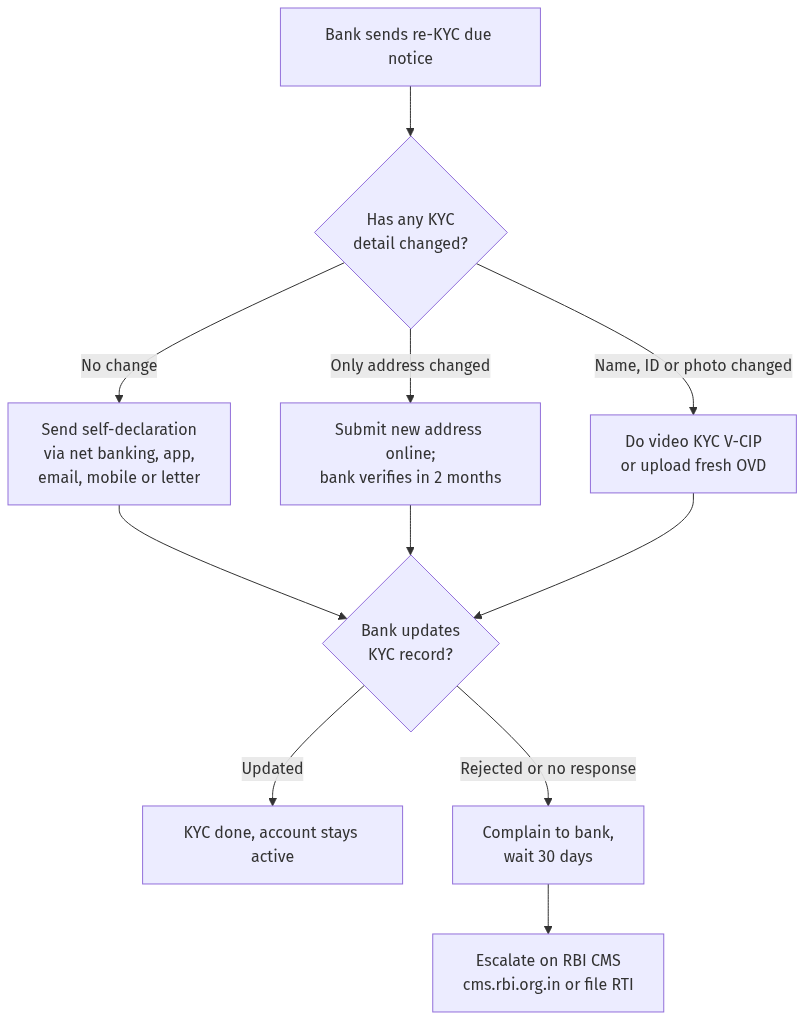
Figure: step-by-step flow. If a step stalls, use the grievance or RTI route shown.
Do not ignore the reminders
RBI does not let banks freeze your account out of the blue. Before the due date, the bank must send you at least three advance intimations, including at least one by letter, and after the due date, at least three reminders, one of them again by letter. Treat the first SMS as your cue, not the last. If your account does get partially restricted because the deadline passed, completing re-KYC lifts the restriction; the process is similar to how you bring back a dormant account to life.
If your bank wrongly restricts an account even though you submitted on time, that is a service failure you can fight, just as with a frozen bank account.
A note on low-risk customers and the 30 June 2026 date
RBI told banks that low-risk individual customers must be allowed all transactions and given until one year from when KYC fell due, or up to 30 June 2026, whichever is later, to finish updation. So if you are low risk, your transactions should keep working while you complete the formality. Use the time, but do send the self-declaration; do not let unclaimed dues build up the way they do for accounts that drift into the UDGAM unclaimed deposits system.
If the bank stalls or refuses
You did your part and the banner still will not clear, or staff insist on a branch visit RBI does not require. First raise a written complaint with the bank and keep the ticket number. If you get no reply in 30 days or are unhappy with the answer, escalate free of cost to the RBI Ombudsman through the Complaint Management System at cms.rbi.org.in under the Integrated Ombudsman Scheme. You can also file an RTI with the bank's public information officer asking which rule it relied on to block your account.
Frequently asked questions
Do I have to pay any fee to update my KYC?
RBI does not prescribe a fee for sending a self-declaration when nothing has changed. Banks generally do not charge for online re-KYC. If your bank demands a charge, ask for the written rule and verify the current position on cms.rbi.org.in before paying.
Is a self-declaration really enough, or do I still need documents?
If nothing in your KYC has changed, RBI confirms a self-declaration alone completes re-KYC. You only need fresh documents when a detail such as your name, address proof or photo has actually changed.
How often does re-KYC fall due?
It depends on your risk category. Banks carry out periodic updation at least once every two years for high-risk customers, eight years for medium-risk and ten years for low-risk customers, so most ordinary savers face it rarely.
Can the bank freeze my account without warning?
No. Before the due date the bank must send at least three advance intimations, including one by letter, and after the due date at least three reminders, one again by letter. Action comes only after these go unanswered.
I only changed my address. Do I need to visit the branch?
No. Submit the new address through net banking, the app, registered email or a letter. The bank then verifies the declared address within two months, so keep an address proof ready in case it asks.
What if I do not use net banking or a smartphone?
You can send the self-declaration by registered email, through an ATM where offered, by a signed letter to the branch, or ask the bank's Business Correspondent to record it. A branch visit is one option, never the only one.
My account got blocked even though I submitted on time. What now?
Complain in writing to the bank and keep the reference. If there is no reply in 30 days or you are not satisfied, escalate free on the RBI Ombudsman portal at cms.rbi.org.in, and consider an RTI asking which rule justified the block.
Sources
For more banking help, see how to reverse minimum balance charges and the latest bank locker rules.
Bank KYC update 2026: RBI rules, what documents are accepted, and what if account is frozen?
RBI has strict KYC (Know Your Customer) norms for bank accounts. Here is the complete guide:
- Step 1: RBI KYC rules. (a) KYC is mandatory for all accounts — savings, current, fixed deposit, (b) KYC must be completed at the time of account opening, © periodic KYC update is required: low-risk accounts every 10 years, medium-risk every 5 years, high-risk every 2 years, (d) the bank must send a reminder 30 days before KYC expiry.
- Step 2: Documents accepted. (a) Officially Valid Documents (OVD): Passport, Driving Licence, Voter ID, Aadhaar, NREGA job card, Letter from National Population Register, (b) for address proof: any OVD with current address, utility bill (electricity, water, gas) not older than 2 months, © for PAN: mandatory for all accounts (Form 60 if PAN not available), (d) for photographs: recent passport-size.
- Step 3: What if account is frozen for KYC? (a) the bank can freeze an account if KYC is not updated after reminders, (b) the freeze typically allows credits but blocks debits (partial freeze), © to unfreeze: submit KYC documents at the branch, (d) the bank must unfreeze within 10 working days of receiving complete KYC documents, (e) if the bank does not unfreeze: file a complaint with RBI Ombudsman.
- Step 4: Video KYC. (a) RBI allows Video KYC for account opening and KYC update, (b) the customer needs a smartphone with camera and internet, © the bank's representative conducts a video call, verifies documents, and captures live photo, (d) Video KYC is equivalent to in-person KYC — no separate visit needed.
- Step 5: Re-KYC process. (a) the bank sends a notice (SMS/email/letter) for re-KYC, (b) visit the branch or use the bank's app/portal for online re-KYC, © submit self-attested copies of OVDs, (d) if there is a change of address: submit new address proof, (e) the bank updates the KYC and confirms.
- Step 6: Common issues. (a) bank freezes account without adequate notice — complaint to RBI, (b) bank demands documents not in the OVD list — refuse and cite RBI master directions, © KYC update delayed despite submission — complaint to branch manager, then RBI Ombudsman, (d) address change not updated — submit new proof and follow up.
- Step 7: File RTI. File RTI with RBI / the bank (for public sector banks) asking for: (a) the number of accounts frozen for non-KYC, (b) the average time to unfreeze after KYC submission, © the number of KYC-related complaints received.
See Bank KYC Update and RBI Ombudsman.