Table of Contents
Check Aadhaar Authentication History 2026

Reviewed on 2026-06-20 by Dr. Shrawan Kumar Pathak.
Quick Reply: Your Aadhaar leaves a trail every time it is verified. Open resident.uidai.gov.in/aadhaar-auth-history or the mAadhaar app, enter your Aadhaar number, verify the OTP sent to your registered mobile, and read the log. It shows the last six months, up to 50 records at a time, free.
The trail your Aadhaar leaves behind
Every time someone runs your Aadhaar through a fingerprint scanner, an OTP check or a demographic match, a record is written. A bank opening an account, a SIM dealer, a fintech app, a government scheme, a property registrar: each one leaves a footprint with a date, a time and an agency name. You normally never see this trail. The authentication history service is where you go to read it.
Think of it as a call log for your identity. You are not auditing your money or your documents here. You are auditing a single question: in the last six months, who asked UIDAI to confirm that you are you, and did you agree to it? If a row appears that you cannot explain, that is your first clue that your Aadhaar may have been used without your knowledge.
What the log actually shows
The service gives you a detailed list of authentication transactions performed against your Aadhaar in the last six months. UIDAI lets you view up to 50 records at one time, so you may need to filter by date to walk through the full period.
Each row tells you four useful things: the date and time of the check, the type of authentication used (fingerprint or iris biometric, OTP, demographic, or a combination), a unique Transaction ID, and a response code. The agency that ran the check is called an Authentication User Agency, or AUA. The Transaction ID is the thread you pull on later if a row looks wrong, so note it down before you close the page.
One limit worth knowing: the log shows that an authentication happened and what kind it was. It does not show your fingerprint, your photo or the actual data exchanged. You are reading a register of events, not the contents.
How to pull your history, step by step
You need one thing above all else: a mobile number that is currently linked to your Aadhaar. The whole service runs on an OTP sent to that number, and there is no way around it.
- Open resident.uidai.gov.in/aadhaar-auth-history in a browser, or open the mAadhaar app and choose the authentication history option.
- Enter your 12 digit Aadhaar number, or your 16 digit Virtual ID if you prefer not to type the full number.
- Type the security code (captcha) shown on screen, then tap Send OTP.
- Enter the OTP that arrives on your registered mobile number.
- Choose the authentication type you want to see (or leave it open to see all), and pick the date range within the last six months.
- Read the records. Note down the Transaction ID and response code of anything you do not recognise.
If you would rather not key in your real Aadhaar number on a shared device, generate a Virtual ID first and use that instead. Our guide to the Aadhaar Virtual ID explains how, and a VID works just as well for this check.
When the OTP never arrives
The number one reason this service fails is a mobile number that is out of date, switched off, or never linked. If no OTP comes, your registered number is almost certainly the problem, not the website. You will have to visit an Aadhaar enrolment or update centre to refresh the linked number before the history will open for you. Until that is fixed, the log stays locked.
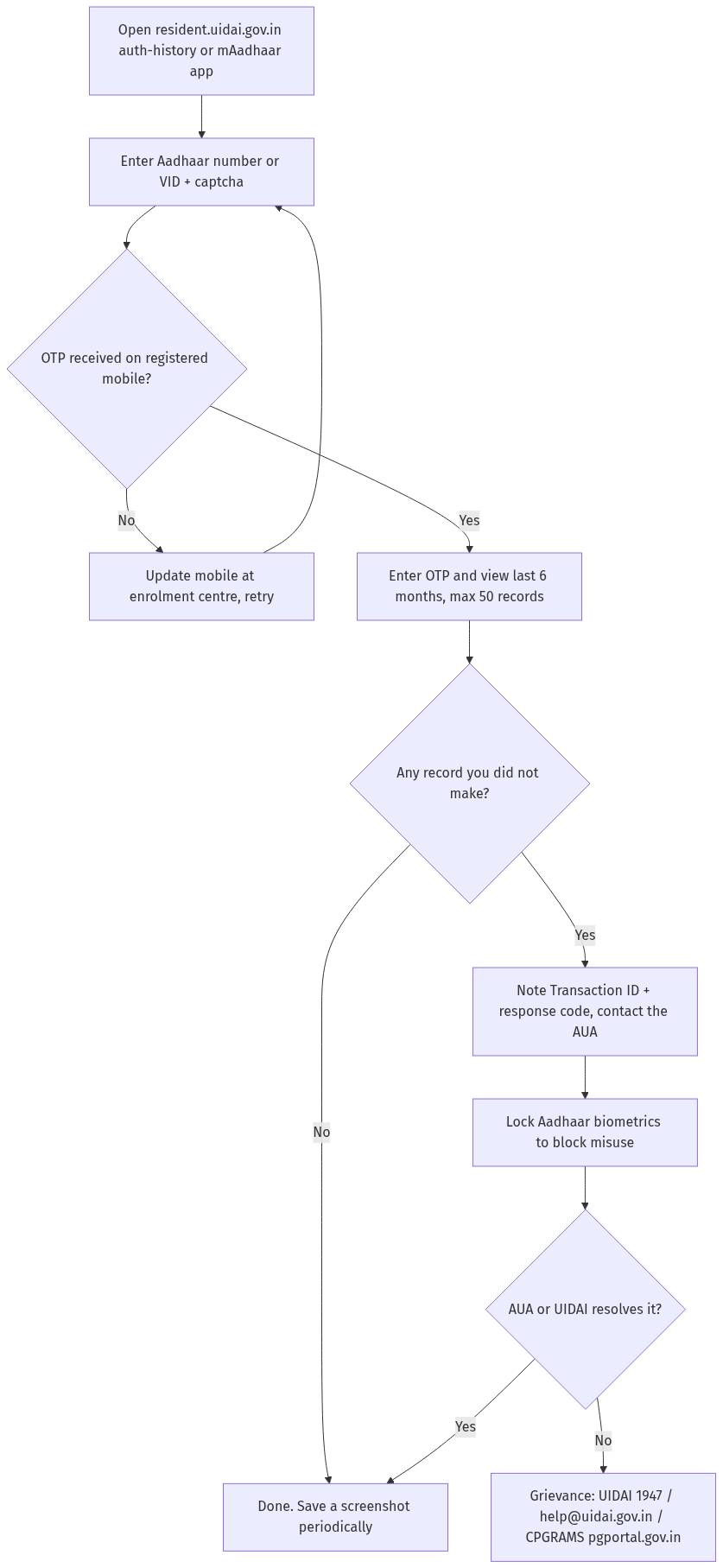
Figure: step-by-step flow. If a step stalls, use the grievance or RTI route shown.
You found a record you did not make. Now what
Stay calm and work the evidence. A single OTP authentication on a date you genuinely used a service is normal. What deserves attention is a biometric check you never gave, a string of OTP checks at odd hours, or an agency you have never dealt with.
First, identify the AUA from the record and use the Transaction ID and response code to raise an enquiry with that agency directly, since they hold the detail of what the check was for. Second, lodge a grievance with UIDAI so the central authority has it on record. You can call the toll free 1947, write to [email protected], or file through the UIDAI web portal. Grievances can also be raised on the central government CPGRAMS portal at pgportal.gov.in, which runs round the clock.
If you suspect active misuse rather than a one off, do not wait for a reply. Lock your biometrics immediately so no fresh fingerprint or iris check can succeed without your unlocking them. Our walkthrough on how to lock and unlock your Aadhaar biometrics takes about two minutes and shuts the door while you investigate.
Build a paper trail, then escalate
Keep a screenshot of every suspicious record, the grievance reference number UIDAI gives you, and the date you raised it. If the AUA or UIDAI does not respond meaningfully, that paper trail is what lets you escalate, whether to a higher grievance authority or by filing a police complaint about identity misuse. A documented timeline turns a vague worry into an actionable case. While you are tightening security, it is also a good moment to refresh your physical card using our guide to the Aadhaar PVC card.
Frequently asked questions
How far back does the authentication history go?
The service shows transactions from the last six months. Older records drop off, so if you want a longer trail you should check periodically and save screenshots. UIDAI lets you view up to 50 records at one time, so use the date filter to step through the full window.
Is checking my Aadhaar authentication history free?
Yes. Reading your own authentication history on the UIDAI resident portal or the mAadhaar app does not carry a fee. If any website asks you to pay to see your Aadhaar usage, treat it as a scam and use the official UIDAI portal only. Verify the current process on uidai.gov.in.
Can I check the history without my registered mobile number?
No. The service sends an OTP to the mobile number linked to your Aadhaar, and that step cannot be skipped. If your number is outdated or missing, visit an Aadhaar enrolment or update centre to link a working number first, then return to the history page.
What does AUA mean in my authentication log?
AUA stands for Authentication User Agency, the bank, telecom operator, fintech firm or department that asked UIDAI to verify your identity. Each AUA generates a unique Transaction ID for the check. Use that Transaction ID and the response code to raise an enquiry with that specific agency.
I see a transaction I never made. Does that mean fraud?
Not always, but treat it seriously. Match the date and authentication type against your own activity first. If it still does not fit, contact the AUA using the Transaction ID, lodge a UIDAI grievance on 1947 or [email protected], and lock your biometrics to block any further misuse while you investigate.
Can I see my actual fingerprint or the data that was shared?
No. The history is a log of events only. It shows the date, time, authentication type, agency and Transaction ID. It does not reveal your biometric data or the personal details exchanged during the check, so it is safe to view.
Will checking my history alert the agency that used my Aadhaar?
No. Viewing your own authentication history is a private read on the UIDAI portal and does not notify any AUA. It is meant precisely so that you, the Aadhaar holder, can quietly audit your own usage and decide whether to act.