Table of Contents
Form 26AS and AIS: Read Them Right 2026
Reviewed on 2026-06-20 by Dr. Shrawan Kumar Pathak.
Quick Reply: Log in at the income tax e-filing portal (incometax.gov.in). Open AIS to see all your reported income and transactions, read the TIS summary it builds, and open Form 26AS on TRACES for your TDS and TCS. Match all three with your own records before you file. Viewing them is free.
Most filing mistakes start with a number you never checked. Before you touch your return, three statements decide whether the tax department's view of your year matches your own. This guide defines each one in plain words, then walks you through reading them in order.
Three terms, defined
Form 26AS
Your tax credit statement. From assessment year 2023-24 onwards, Form 26AS on the TRACES portal shows only your TDS (tax deducted at source) and TCS (tax collected at source) data. Think of it as the receipt for tax that someone else already deducted and deposited against your PAN.
AIS (Annual Information Statement)
Your full transaction file. AIS is the wide picture: salary, interest, dividends, share and mutual fund transactions, tax payments, refunds, foreign remittances, GST data and more. It is split into Part A (your general details, like PAN, masked Aadhaar, name and address) and Part B (the actual TDS/TCS information, SFT information from reporting entities, payment of taxes, demand and refund, and other information). AIS is where you give feedback when something is wrong.
TIS (Taxpayer Information Summary)
The short version that fills your form. TIS is a category-wise rolled-up summary built from AIS. For each head it shows a processed value and a derived value. The derived value, after you accept or correct AIS entries, is what prefills your income tax return. Read TIS first to see the headline numbers, then dig into AIS for the line items behind them.
So the short rule: 26AS is your tax credit, AIS is your transaction story, TIS is the summary that lands in your return.
How to view them, in order
Step 1: Open AIS
Log in at incometax.gov.in with your PAN or Aadhaar and password. From the dashboard, open the AIS menu (or go through Services then Annual Information Statement). Two tiles appear: TIS and AIS. Open TIS first for the summary, then AIS for the detail. You can download AIS in PDF, JSON or CSV. The PDF opens with a password: your PAN in lowercase followed by your date of birth in DDMMYYYY format, with no spaces.
Step 2: Open Form 26AS
From the same portal, go to e-File, then Income Tax Returns, then View Form 26AS. You will be sent to the TRACES portal; confirm the redirection, agree to the terms, then pick your assessment year. For income earned in financial year 2025-26 you select assessment year 2026-27. Choose HTML to view on screen or download a copy. Check that every TDS entry matches the Form 16 or Form 16A your deductor gave you.
Step 3: Reconcile against your own records
Lay the three side by side. Does the salary in TIS match your payslips and Form 16? Does interest match your bank and post office statements? Does each TDS line in 26AS appear in AIS too? If your figures, AIS and 26AS all agree, the prefilled return is safe to use. If anything is off, fix it before you file, never after.
Step 4: Fix wrong data with AIS feedback
In AIS, click the line that is wrong, then the Optional button in the Feedback column, and pick the option that fits:
- Information is correct
- Transfer not in the nature of sale
- Income is not taxable
- Information is not fully correct
- Information relates to other PAN or year
- Information is duplicate or included in other information
- Information is denied (you do not recognise the transaction)
Submit it. AIS then shows your modified value beside the reported value, and the corrected figure flows into TIS, which prefills your return.
On your phone
The Income Tax Department offers a free app, AIS for Taxpayer, on Google Play and the App Store. It shows the same AIS and TIS information and lets you submit feedback, which is handy when you only have a mobile to hand.
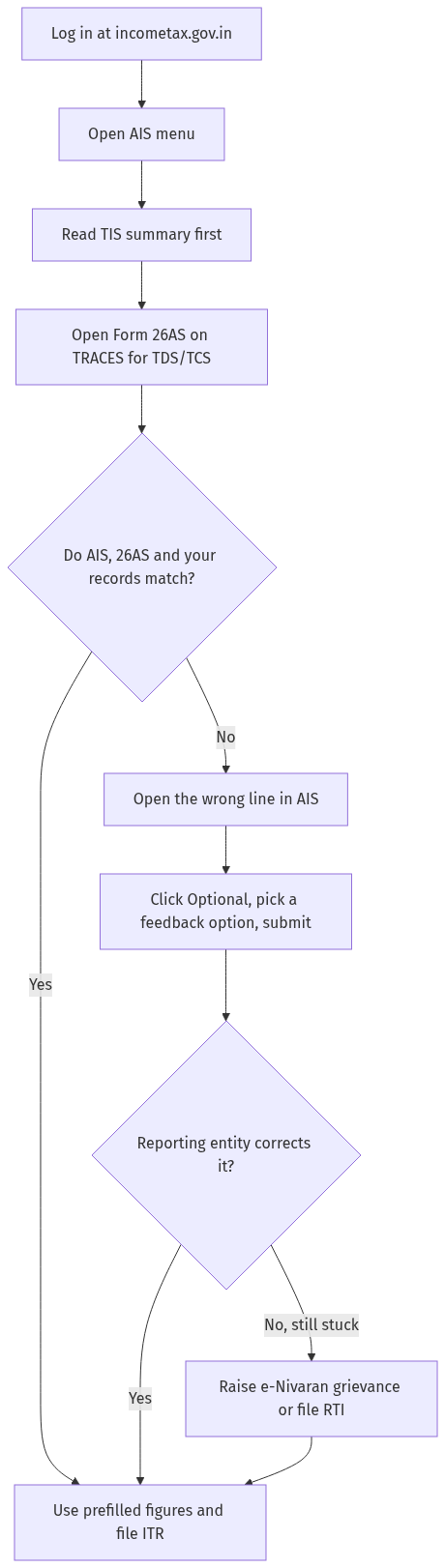
Figure: step-by-step flow. If a step stalls, use the grievance or RTI route shown.
When the data stays wrong
Feedback tells the department you disagree, but the figure changes for good only when the reporting entity (your bank, employer or registrar) revises what it filed. If you have submitted feedback and the entry is still wrong after a reasonable wait, raise a grievance through the e-filing portal's grievance (e-Nivaran) module, quoting the AIS information ID. If a public authority holds a record you genuinely cannot get any other way, you can file an RTI or complaint route, though for most AIS mismatches the feedback and grievance path is faster.
Once your statements are clean, you are ready for the rest of the filing chain: confirm the figures, then file your ITR online, e-verify it, and later track your refund. If a deductor's TDS is missing from 26AS, your Form 16 is the proof you raise it with.
If your bank shows a direct-tax debit but Payment History has no challan receipt, use the CRN and missing-challan guide before you pay again or claim that tax in your return.
Frequently asked questions
Why does my Form 26AS show less now than before?
Because its job shrank. From assessment year 2023-24, Form 26AS carries only TDS and TCS data. Everything else, like high-value purchases, interest and SFT entries, moved to AIS. You did not lose anything; it is just in a different statement now.
Which statement should I trust if AIS and 26AS disagree?
Trust neither blindly; trust your own records. For a tax credit, 26AS is the deciding statement because that is the tax actually deposited against your PAN. For income figures, AIS and TIS lead. Where they clash, use AIS feedback to flag it.
What is the password to open the AIS or TIS PDF?
Your PAN in lowercase followed by your date of birth (or date of incorporation) in DDMMYYYY, with no spaces or gaps. So PAN AAAAA1234A with a birth date of 28 July 1997 gives aaaaa1234a28071997.
I gave AIS feedback but the number has not changed. Now what?
Feedback records your disagreement, but the source value updates only when the reporting entity revises its filing. If it stays wrong, raise an e-Nivaran grievance on the portal with the information ID. Keep your own bank or salary proof ready.
Can I file my return without checking AIS?
You can, but it is risky. The department reconciles your return against AIS automatically, and a gap can trigger a notice. Reading AIS and TIS first is the simplest way to avoid one. If a notice does arrive, see our guide on how to reply to an income tax notice.
Is there any fee to view Form 26AS or AIS?
No. Viewing and downloading both Form 26AS and AIS through the income tax e-filing portal is free. If any site asks you to pay to see your own statement, it is not the official portal.
I spotted the mismatch only after filing. Is it too late?
No. You can correct it by filing a revised or belated return within the allowed window. See our guide on revised and belated ITR for the current timelines and steps.
Sources
Form 26AS and AIS: How to reconcile, file RTI for missing entries, and claim refund?
Form 26AS and AIS are essential for tax filing. Here is the complete guide:
- Step 1: What is Form 26AS? (a) Form 26AS is the annual tax credit statement (it shows all TDS deducted against your PAN — from salary, interest, commission, etc.), (b) it is available on the Income Tax portal (incometax.gov.in → “Login” → “View Form 26AS”), © it is updated quarterly (Q1: July, Q2: October, Q3: January, Q4: June), (d) the TDS shown in Form 26AS must match the TDS claimed in your ITR (if there is a mismatch — the income tax department may reject the TDS claim and issue a demand notice).
- Step 2: What is AIS? (a) AIS (Annual Information Statement) was introduced in 2021 (it is a more comprehensive statement — it shows: TDS, TCS, SFT transactions, foreign remittances, dividend income, interest income, mutual fund transactions, etc.), (b) AIS is available on the Income Tax portal (incometax.gov.in → “Login” → “Annual Information Statement (AIS)”), © AIS is updated throughout the year (not just quarterly — the information is uploaded by various sources including banks, companies, and registrars).
- Step 3: Common problems. (a) TDS is deducted but not reflected in Form 26AS (the deductor has not filed the TDS return — or has filed with wrong PAN), (b) AIS shows income that you have not earned (someone else has used your PAN — or the bank has reported incorrectly), © the TDS in Form 26AS does not match the TDS in your Form 16/16A (the employer/deductor has made an error), (d) AIS shows high-value transactions that you did not make (this could be identity theft — or a reporting error).
- Step 4: How to reconcile. (a) download Form 26AS and AIS from the Income Tax portal, (b) compare with your: (i) Form 16 (salary TDS), (ii) Form 16A (other TDS), (iii) bank statements (interest income), (iv) mutual fund statements (transactions), © identify mismatches: (i) TDS deducted but not in 26AS (the deductor has not filed the TDS return — or filed with wrong PAN), (ii) TDS in 26AS but not in Form 16 (the employer has not provided the correct Form 16), (iii) income in AIS that you did not earn (report to the income tax department — this could be identity theft).
- Step 5: How to correct. (a) if TDS is deducted but not in 26AS: contact the deductor (request them to file/correct the TDS return — the deductor can file a revised TDS return), (b) if the deductor does not correct: file a complaint with the jurisdictional Assessing Officer (the AO can issue a notice to the deductor), © if AIS shows wrong information: file a correction on the Income Tax portal (incometax.gov.in → AIS → “Submit Feedback” — the information source is notified to correct), (d) if someone else has used your PAN: file a police complaint (identity theft — and inform the income tax department).
- Step 6: File RTI. File RTI with the Income Tax Department (CPC or the jurisdictional AO) asking for: (a) the TDS entries against PAN [number] for financial year [year] (as per Form 26AS), (b) the TDS returns filed by [deductor name/TAN] for financial year [year] (to verify if the deductor has filed the return), © whether any TDS return has been filed with wrong PAN [number] (if yes: provide the details), (d) the status of the correction request submitted on [date] (if you have submitted a correction on the portal).
- Step 7: Claim refund despite mismatch. (a) if TDS is deducted but not in 26AS: you CANNOT claim the TDS in your ITR (the income tax department will reject the claim — because 26AS does not show it), (b) however: file the ITR with the TDS claim (and attach the TDS certificate — Form 16/16A), © the AO may allow the claim based on the TDS certificate (even if 26AS does not show it — the AO has the discretion to verify with the deductor), (d) if the AO rejects: file an appeal with the CIT(A) (Commissioner of Income Tax (Appeals) — the CIT(A) can allow the claim based on the TDS certificate), (e) file a writ petition in the High Court (if the TDS is genuinely deducted — the court can order the department to allow the claim).
See e-Verify ITR and Find PIO.