Table of Contents
Form 16 Explained 2026
Quick Reply: Form 16 explained for 2026: read your salary TDS certificate, match it to Form 26AS and AIS, fix any mismatch, and use it to file your ITR right today
Reviewed on 2026-06-20 by Dr. Shrawan Kumar Pathak.
Quick answer. Think of Form 16 as your salary's annual tax receipt. Your employer issues it by 15 June each year as proof of the tax deducted from your pay. You read it, match it against Form 26AS and the AIS on incometax.gov.in, and use it to file your income tax return.
Form 16 is your salary's annual tax receipt
When a shop deducts something at the till and hands you a printed slip, you keep that slip as proof. Form 16 is the same idea, scaled up to a whole year of salary. Every month your employer cuts a slice of tax from your pay, called TDS, and deposits it with the government against your PAN. Form 16 is the year-end receipt that records exactly how much was cut and where it went.
It is issued under Section 203 of the Income-tax Act, 1961 for tax deducted on salary under Section 192. Your employer must hand it to you by 15 June of the year after the financial year ends, under Rule 31 of the Income-tax Rules. So for the year that closed on 31 March 2026, your Form 16 is due by 15 June 2026.
Knowing what is inside the receipt is only half the job. The real skill is reading it, checking it, and using it to file. That is what this guide walks you through.
What the two parts tell you
Form 16 comes in two parts, like a receipt with a summary on top and an itemised bill below.
Part A is the deposit summary. It is generated from the government's TRACES system and carries a unique certificate number, your employer's TAN, your PAN, and the quarter by quarter record of TDS deposited.
Part B is the itemised working. It shows your gross salary, the exemptions and deductions claimed, and the final tax computed.
If you want the deeper breakdown of each part and how your employer pulls Part A from TRACES, read our companion guide on the difference between Form 16 Part A and Part B. This article stays on what you, the employee, do next.
Read your Form 16 the smart way
Open the PDF and run these checks like you would read a bill before paying it.
Check the basics
Confirm your name, your PAN, and the assessment year are correct. A wrong PAN means the tax will not show against you, no matter how much was deducted.
Read the totals, not just the bottom line
Note the total TDS in Part A and the taxable income in Part B. These two numbers are what you will carry into your return and what you must cross-verify next.
Match it against the portal before you trust it
Form 16 is your employer's word. The portal is the government's record. They should agree, and your job is to confirm they do.
Log in at incometax.gov.in and open your Form 26AS and your Annual Information Statement (AIS). The TDS figure on Form 16 Part A should match the salary TDS shown in Form 26AS. If a quarter is missing or a number is short, your employer may not have filed or deposited correctly, and that gap can come back to you as a tax demand later.
Our guide to reading Form 26AS and the AIS shows you exactly where these figures sit and how to spot a mismatch.
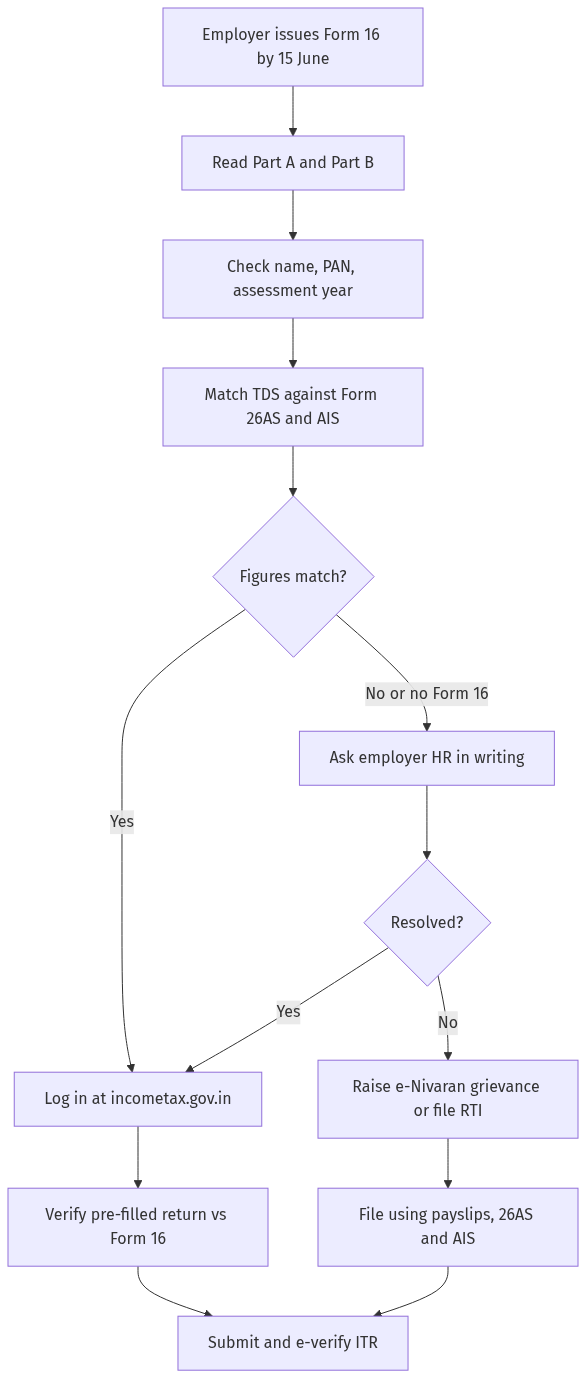
Figure: step-by-step flow. If a step stalls, use the grievance or RTI route shown.
Use Form 16 to file your return
Once Form 16 and the portal agree, filing is mostly confirmation work.
- Log in at incometax.gov.in and start your income tax return for the assessment year.
- The salary, deductions, and TDS usually pre-fill from your employer's filing.
- Open Form 16 Part B beside the screen and check each pre-filled figure against it.
- Add anything Form 16 missed, such as interest income or a deduction you forgot to declare to your employer.
- Submit the return, then e-verify it.
A return is not complete until you e-verify it, and you have a fixed window to do so. Our guide on how to e-verify your ITR covers every method, including Aadhaar OTP.
Changed jobs during the year?
If you worked for two employers, you get two Form 16 documents. File using both, adding the salaries together, so your total income and total TDS are correctly captured. Do not file using only one, or the portal will flag the missing income.
If you do not receive your Form 16
You cannot be denied your receipt. If 15 June passes and nothing arrives, work through these steps.
First, ask your employer's HR, payroll, or finance team in writing and keep a copy of the request. Late or non-issue exposes the employer to a penalty per day under Section 272A(2)(g) of the Income-tax Act, so a written reminder usually works.
If they still refuse, you are not stuck. You can file your return using your monthly payslips together with Form 26AS and the AIS on incometax.gov.in, because the deducted tax already shows there.
To escalate, raise a grievance through the e-Nivaran facility on incometax.gov.in. If your employer is a government office or a public-sector body, you can also file an **RTI** asking for the date of issue and the certificate details of your Form 16.
If your filed return later draws a notice because of a TDS mismatch, our guide on how to reply to an income tax notice explains the response.
Frequently asked questions
When will I get my Form 16 for 2026?
For the financial year that ended on 31 March 2026, your employer must issue Form 16 by 15 June 2026, under Rule 31 of the Income-tax Rules. Many issue it earlier once the year-end TDS return is filed.
Can I download Form 16 myself from the income tax website?
No. Only your employer generates and issues Form 16, partly from the TRACES system. You receive it from your employer, usually by email or through the payroll portal, not as a self-download from incometax.gov.in.
Can I file my ITR without Form 16?
Yes. Form 16 makes filing easier, but the tax already shows in Form 26AS and your AIS on incometax.gov.in. With your payslips and those statements you can compute your salary and TDS and file your return.
What if the TDS in Form 16 does not match Form 26AS?
Tell your employer at once, because the figures should agree. A shortfall in Form 26AS usually means the employer has not deposited or reported correctly. File on the verified figures and keep proof of the deducted amount.
Do I get Form 16 if no tax was deducted from my salary?
If no TDS was deducted, your employer is not strictly required to issue Form 16, though many still provide a salary statement. You can still file your return using your payslips and the portal statements.
I changed jobs. How do I use multiple Form 16 documents?
Add the salary and TDS from each Form 16 together and report the combined figures in one return for the year. Filing on a single Form 16 understates your income and can trigger a notice.
My employer refuses to issue Form 16. What can I do?
Send a written request first. If it is ignored, raise an e-Nivaran grievance on incometax.gov.in, and for a government or public-sector employer you may file an RTI for the issue date and certificate details. You can still file your return meanwhile using Form 26AS and the AIS.